Archives for May 2009

Ohio CollegeAdvantage 529 Plan Referral Promotion Code: Free $25

This is a friendly reminder that you can still get a $25 head start to your child’s college fund if you open a 529 account with the Ohio CollegeAdvantage plan and fund with $25 of your own. Not only is the free money nice, but this is actually a very good plan in which I am making monthly automatic contributions.

Rated a Top 529 Plan by Morningstar
In a recent article The Best and Worst 529 College-Savings Plans by Morningstar, the Ohio CollegeAdvantage plan was rated in the top 5 plans:
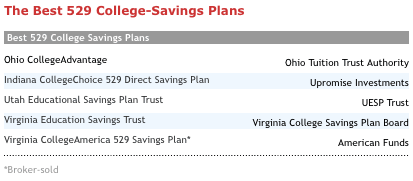
Features they liked included having a wide variety of investment options (including active/passive, multiple age-based options, and even ultra-safe CDs), as well as low total expenses. In-state resident can also deduct up to $2,000 of contributions per year, with excess carryover allowed.

My Investment Choice: Inflation-Protected Bonds
529 plans aren’t perfect, and you have to be careful about what you’re invested in. This article I found on BH summarizes my concerns well:

…saving for college isn’t like saving for retirement. The run-up is much shorter, 18 years at most instead of 30 or 40, so most of the miraculous gains of compound interest are lost. Second, the payout is far more immediate and inflexible. People can choose when to retire, delay if they have to, and ride out ups and down in the market over decades. For most students, college happens three months after graduation, ready or not, and the check is due on Day 1.

I explored some conservative 529 investment options here, and based on my conclusions I am currently putting all my contributions into the Vanguard Inflation-Protected Bond option. This works especially well since TIPS are best held in tax-advantaged accounts.

Refer-A-Friend Bonus Instructions

  1. You can enroll online or via mail. The online process was quick and easy, and I didn’t have to mail in anything.
  2. The first step is to input your personal info and choose a login/password. Next, you’ll verify your e-mail and complete the application.
  3. After that, you’ll choose your funding amount and select an investment fund. Your initial deposit must be a least $25, and is funded using the account/routing numbers of your bank account. At the bottom, you will need to enter a referral code to get the bonus. Enter *.
  4. In 1-3 days, your initial deposit will be sucked out, and in 5-7 business days you will get your $25 bonus. The $25 will be deposited directly into the 529 account, and will be invested in the same thing as your initial deposit.
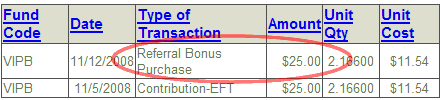
* Number is randomly generated. If you can’t see any numbers above, please use 2483590. With this program, both the newly referred and the referrer get $25. As promised, I have received several referrals from readers, and have thus included their referral codes to be shared here. I probably won’t have time to do it again for this promotion, but keep your eyes out for future similar offers.

2009 Berkshire Shareholder Meeting Transcript / Minutes

If you’re interested in what Warren Buffett and Charlie Munger said in their famous Question & Answer session of the 2009 Berkshire Hathaway Annual Meeting, the best raw source I found was this page of the Omaha World-Herald. It’s written in a “live blog” format, which seems to cover all the major questions in easy-to-read bites with adding too much extra opinion or analysis.

Free KFC Grilled Chicken Meal From Oprah

The Oprah Show is giving away coupons for a free Kentucky Grilled Chicken meal from KFC until 9:59pm CDT 5/6/09. 2 pcs Grilled Chicken, 2 sides, and a biscuit. Free lunch!

The official website is UnthinkKFC.com, but you have to install some coupon printer software on your computer (to prevent making a bajillion copies). Ironically, due to the site crashing earlier, right now you can simply download the .pdf file from Oprah.com.

TreasuryDirect Security: Should All Financial Websites Be Like This?

TreasuryDirect, which allows individuals to buy securities online directly from the US Treasury, has to be the least accessible financial website in the country. It takes me about 20 minutes to log in each time! Let’s look at all the hoops we get to jump through:

Account number – Of course it can’t be a username you can remember like “bob222”, but is more like Z-334-946-124. This makes me have to dig up my encrypted login/password file.

Password – Use your own keyboard? Nope, you must click it out on a randomized virtual keyboard. Gets around basic keyloggers, but not something that catches your screen as well. I’m actually okay with this one, but I’m glad my password isn’t very long and my vision is good.

td_login.gif

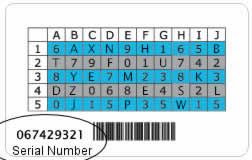
Access Card – Finally, you need to read characters off a Access Card in order to access your account. (Like a secret decoder ring!) Of course, being a physical object, I can never find it. I ended up transcribing the entire card contents onto a spreadsheet file, and shredded the card.

Now, finally you can buy a savings bond. Can you imagine the hassle if every financial institution were like this? I understand the need for security, but I think having a physical type of verification token should be an option for the customer, not a requirement.

Lost TreasuryDirect Access Card?
If you lost your card, you’ll have to call (304) 480-7711, verify your identity, and request for a new one to be sent to your mailing address. Your old card will no longer work. In the meantime, no access. Call early and keep trying until you reach someone, because if they’re busy you have to leave a message (no hold system?), and they never called me back.

Capital One 360 Referral Giveway (Expired)

Do you have an Capital One 360 savings account with unused referrals? I usually have lots of $25 bonus links available, but have been falling behind again. The first 25* people who comment below tonight and leave a working contact e-mail (real name not required, e-mail will not be shared publicly) will get one filled by me for free, which is $10 for you. Gone in 15 minutes, wow! Will do it again later.

Due to comment moderation, your comment may not show up right away. One referral per person. You cannot have had a “freebie” before. Look for a message from me to your e-mail address with further instructions later on.

Monthly Financial Status / Net Worth Update (May 2009)

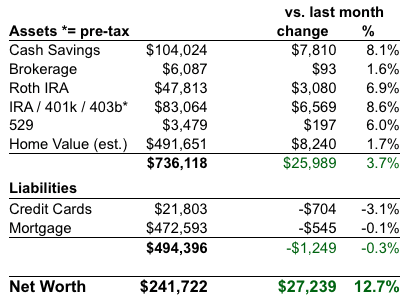
Net Worth Chart 2009

Credit Card Debt
In the past, I have taken money from credit cards at 0% APR and placed it into high-yield savings accounts or similar safe investments that earn 4-5% interest or more, and keeping the difference as profit. I even put together a series of step-by-step posts on how to make money off of credit cards in this way. However, given the current lack of great no fee 0% APR balance transfer offers, I am have not been as active in this “game” recently. My credit score remains high enough that I haven’t seen any negative actions.

Retirement and Brokerage accounts
The market rally was sustained during April, so our predominantly passive investment portfolio increased a bit. We contributed another $2,312 in 401(k) salary deferrals this month including company match. See my investment portfolio page for more details.

I get attracted to various different ideas as time passes, but I really haven’t changed my investment portfolio in about two years now. I always need to remind myself to stick to the basics.

Cash Savings and Emergency Funds
Our cash savings rose again, and although I want to keep one year of expenses for our emergency cash reserves, I need to start putting more money to work in the stock market and other investments. It’s just hard to let go of the security of cash right now. We are contemplating whether we want to save up for a rental property.

Home Equity
I used the same internet valuation tools as before – Zillow, Cyberhomes, Coldwell Banker, and Bank of America (old version).

I have zero personal input here, I just average out what the sites say. They say up. The number shown is after an additional 11% reduction to be more conservative. Not that it really matters, as I am primarily focused on paying off the mortgage, as outlined in my quick and dirty plan for financial freedom!

Access Morningstar X-Ray, Portfolio Management Tools For Free

Morningstar.com has a bunch of helpful tools for managing your investment portfolio. Many of them are free, but some require you to be a member. Premium membership is not cheap at $174 a year ($115 with Fidelity account), although you do get other features like mutual fund analyst reports. But since I’m not interested in those, I was happy to discover that most of the free tools and even some of the normally paid tools are available to all at T. Rowe Price. You don’t even need an account with them. Both sites require free registration (basically just e-mail).

Here is a roundup of the tools that are available, along with links to both sites where available. Since many of the tools are integrated, I have found it easier just to keep all my data at T. Rowe Price.

Portfolio Manager (TRP / Morningstar)
Portfolio Manager “enables you to track, rebalance, and analyze your portfolio. It includes a complete picture of all your holdings’ prices and performance – individual securities and funds together – in a convenient one-page format that’s updated throughout the trading day.” You can either track all your transactions as you go, or just input your current holdings. The Morningstar version differs by appearing to be slightly newer, and allows you to import your portfolio from an external Quicken/Money/Broker .csv file.

Portfolio X-Ray and Portfolio Instant X-Ray (TRP / Morningstar)
The Morningstar Portfolio X-Ray tool is a great tool that lets your look “under the hood” of your mutual funds. Does your “small cap” fund really own a bunch of mid-caps and large-cap funds? X-Ray will reveal your true exposure to stock style (i.e. Small/Mid/Large, Growth/Blend/Value), geographical regions (i.e. Japan, US) , stock sectors (i.e. Telecom, Energy), and individual equities (i.e. type, Top 10 holdings).

Also, by looking at your portfolio as a whole, you can see your true asset allocation. Maybe some of your funds have overlap that you didn’t know about. The “Instant” version, which the only version available for free at Morningstar, does not allow you to save your portfolio X-rays for future sessions.

Asset Allocator (TRP / Morningstar Premium Only)
Asset Allocator “is a quick, simple calculator that shows the probability of achieving an investment goal based on current portfolio value, investment mix, and savings rate.” Fun to play with for a while, but if you aren’t savvy it can create the illusion that the answer to reaching your goals is simply to increase your stock percentage until you get the return you want. Use with caution.

Portfolio Watchlist (TRP / Morningstar)
Portfolio Watchlist “helps you track your investments against pricing and volume targets in a convenient one-page format that’s updated throughout the trading day.” Basically the same as Portfolio Manager above, but you can track a bunch of different model portfolios. This is great for creating a benchmark for your performance, or seeing what would happen if you tweaked something.

IRA Calculator (TRP / Morningstar)
A somewhat basic tool, but still handy. The IRA Calculator has three different sections: Eligibility (determine your contribution limit for a Roth or Traditional IRA), Comparison (compare various scenarios to find out which type of IRA works best for you), and Conversion (find out whether it makes sense to convert a Traditional IRA to a Roth IRA).

Become a KGB Special Agent: Text Message 411 Service

Here’s another find for the Bored Money category, which are ways to earn some money on the side that aren’t really high-paying on a per-hour basis, but aren’t bad if you’re just bored.

KGB, short for Knowledge Generation Bureau, is a “text-message-based information service”. You text any question to KGBKGB (542542), and for 99 cents they’ll answer you via text message. I’m not exactly sure why people would use this instead of the free ChaCha service, but perhaps they have better quality standards. Time.com tried it out and shared some unedited questions and answers.

Anyhow, KGB hires people working at home (or slacking at work…) to answer these texts as 1099 independent contractors. You get paid 10 cents for each answer you research yourself, and 5 cents for each “validation” answer where you simply double-check an automated response pulled from their database. You must work a minimum average of 6 hours per week. Reportedly, they are looking for people to fill the late-night shifts.

To apply, you have to pass a Special Agents Challenge test first, which is kind of fun but the main challenge is how fast you can type and use Google (though I guess that’s really the point of the job). I couldn’t pass up a trivia quiz, but didn’t feel like completing the application since 6 hours a week is too much of a commitment for me. This would fit someone who either loves to surf the web anyway, wants some extra cash, and doesn’t mind making probably a bit below minimum wage in exchange for very flexible hours and zero commute.