
Updated for 2025. This year, the deadline for federal tax filing is Tuesday, April 15th, 2025. If you file for an extension before midnight on that date passes, you can extend the time allowed to file your return by six months to October 15th, 2025. It does not extend the time to pay any tax due. There are many legitimate reasons to ask for such an extension, and the extension is granted automatically without needing to provide a specific reason. In the past, I had a Schedule K-1 that consistently arrived after 4/15, so I would file an extension to file instead of having to make an amended return (I later sold that holding).
Why is filing an extension important? The “Failure to File” Penalty is 5% of the unpaid taxes for each month (or part of the month) that the tax return is late (without extension). The “Failure to Pay” penalty is 0.5% of your balance due for each month (or part of a month). That’s a 10X difference!
The good news is that you can instantly e-file a federal and state tax extension (where available) for free. Advantages of using e-File include:
- You save the time and postage costs of paper mailings.
- You can estimate your tax liability using online software and/or calculators.
- You receive confirmation of receipt via e-mail or text, often within hours.
- The potential convenience of filing your state tax extension online at the same time.
TaxAct

Tax prep software TaxAct allows you to e-File your Federal and State extension (where applicable) for free through them. I use TaxAct to file my extensions because after using them once, I just found them to offer the most easy and useful user interface. They guide you through the process for federal and every state, letting you choose between printing the form to mail or e-Filing the state extension if available. You don’t need to input payment information, or even use them to file your actual taxes, although you certainly could.
Directions
First, register for free at TaxAct.com with your e-mail address and pick a password if you haven’t previously. You must start a new tax filing, but you don’t need to enter anything. Just look for the option to “File Extension” on the purple left menu bar, and follow their interview directions.
TaxAct supports the electronic filing of extension forms for the following states:
- Arkansas
- Arizona
- California
- Connecticut
- District of Columbia
- Kentucky
- Louisiana
- Maryland
- Massachusetts
- New Hampshire
- New Jersey
- New York
- North Carolina
- Oklahoma
- Pennsylvania
- Tennessee
- Texas
- Virginia
- West Virginia
- Wisconsin
Afterward, you can confirm the status of your extension e-file by going to efstatus.taxact.com. They will even send you a confirmation via e-mail or text message. I got my confirmation less than 3 hours after submission.
IRS Direct Pay
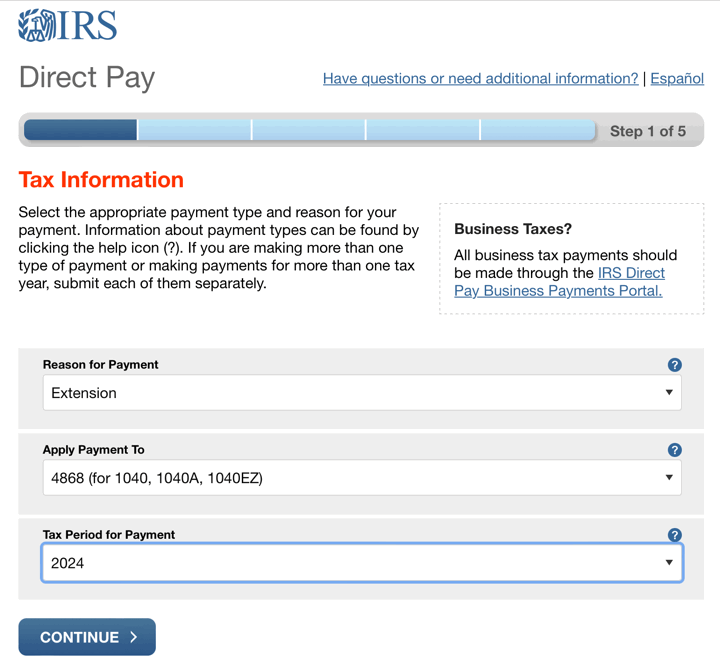
If you only have Federal taxes to worry about, the most direct way to file an extension would be to use IRS Direct Pay. Even if you don’t think you’ll owe any taxes, you can just submit a non-zero payment of $1 (or whatever) and they will file an extension for you along with the payment (remember to note this payment when you later file). As shown in the screenshot above, just choose “Extension” as the Reason for Payment, “Form 4868 (for 1040, 1040A, 1040EZ)” as the Apply Payment To, and 2024 (or whatever applies in your case) as the Tax Period for Payment. You will probably have to answer some identity verification questions, so try to have your previous year’s tax return ready.
Most other tax filing software will also file extensions for you in a similar manner, including TurboTax and H&R Block. I’m not completely sure about all of their state e-File offerings.
(Note: For the 2024 Tax Year, disaster victims in twelve states have automatic extensions to file and pay their 2024 taxes. This includes taxpayers in the entire states of Alabama, Florida, Georgia, North Carolina and South Carolina.)
 The Best Credit Card Bonus Offers – 2026
 Big List of Free Stocks from Brokerage Apps
 Best Interest Rates on Cash - 2026
 Free Credit Scores x 3 + Free Credit Monitoring
 Best No Fee 0% APR Balance Transfer Offers
 Little-Known Cellular Data Plans That Can Save Big Money
 How To Haggle Your Cable or Direct TV Bill
 Big List of Free Consumer Data Reports (Credit, Rent, Work)
I’ve never understood the benefit of an extension. Taxes are very easy to do (especially with TaxAct) and after receiving all my forms in January, I have 3 months to complete the forms, file and pay. As I understand it, you still have to pre-pay taxes when filing an extension or else pay a fee.
So what benefit do I have for filing the extension, besides the buzz of procrastination for a few more months?
“As I understand it, you still have to pre-pay taxes when filing an extension or else pay a fee. So what benefit do I have for filing the extension, besides the buzz of procrastination for a few more months?”
Well, of course you’re better off filing on time than extending. But if you are not able to get your taxes properly done in time, then you need to file an extension and pay your estimated taxes. Otherwise you will be fined a penalty.
There are a lot of people who have complicated tax returns. Many people received K-1’s for various investments they have. Many of the companies responsible for issuing these K-1’s don’t get them done and out to everyone by April 15th. If you don’t have all the correct paperwork, you cannot accurately prepare and file your taxes. So that is why many people file extensions. Of course, some people are lazy and put it off, but that is not the main reason for extensions.
lol “taxes are very easy to do”
you clearly do not run your own business and slave away for your W2
Some people with complex tax situations may need more time to sort it out. IRA re-characterizations, stock option grants/exercises, exotic deductions. It’s not all W-2’s and 1099’s for everybody.
Let’s not forget that the IRS has a phone number (toll-free) where you can call and get the extension automatically. As for the state taxes, at least in my state you can mail in the extension request once you have called the IRS. All free except the $0.45 stamp.
I file an extension every year. I own two businesses. Both of them are busiest in Q1, so I have no time to get my stuff together by April 15. Making sure I’m profitable around that time is too important to me. And I can’t file my individual extension until my business taxes are done. Thus, my reason for the extension. And I know a lot of other biz owners who do the same thing.
Good luck calling the IRS phone number! It’s impossible to get someone on during the busiest time of the year.
e-filing it thru a website is worth it. That confirmation from the IRS is a must. I trust that more than I do sending something in the mail these days.
I’ve used the IRS phone number; it’s a particular number they have to handle extension requests. It’s automated. You don’t have to interect with a human at all.
Harish,
I think that number was disconnected 2 years ago. Now, if you want to us the phone you have to call Official Payments or Link2Gov. The can extend on the phone, but only if you make a tax payment through their service, and they charge a “convenience fee” of 2.5% of what you owe.
Most “free” tax services have hidden fees.
I need that phone number for extensions at the IRS. Anyone?
Based on this information from the IRS (http://www.irs.gov/taxtopics/tc304.html), I don’t think there is a phone option.
Even if you extend, it is still worth paying as much as possible to avoid late payment penalities. Extension does not mean no taxes due,. Also to the previous commenter, you need to submit a form which you can only do online or via mail.
Thanks for the dead lead, Harish! I called the IRS, and after 30 minutes of being on hold, they said either send in the form, or use an online provider (that whole Authorized IRS e-file thing).
I tried the Free File Fillable Forms (mouthful!) and couldn’t even get past the annoying account setup page… it kept rejecting that automated verification code at the beginning.
Amen to FileLater for having an easy solution that actually gets the job done. WELL worth the $20!
E-File federal tax extention of time.
Mike- Thanks! Turbo Tax provides free extensions online. I wasn’t previously a Turbo Tax user and had to create a login. It was EASY and FREE!
The advantage to filing an extension is when you can’t afford your taxes and you pay some now and some later. It’s for people who are toeing the line…! (like me!)
Thanks Mike for the tip!! I was a TurboTax user, and missed this service – it was easy, and such a relief.
Jonathan, Thanks for a useful website. I used TaxAct to file extension. I have not received any mail/communication. Should I expect any communication from IRS or is there place to verify that the extension has been approved. Thanks in advance
That’s nice if Adam doesn’t need an extension but I wonder why he cares that some of us do. Just cuz taxes are easy FOR YOU, Adam, please don’t assume it’s the same for everyone.
What really surprises me is that Harrish 2x mentions this IRS phone number but doesn’t actually give it.
Here’s my experience with Turbo Tax this year.
I click on a link at my bank’s web site for Turbo Tax.
I select the ‘free” file online option.
I select “file an extension”
I fill out all the highly confidential info required for an extension (SS#, AGI for ’08) when I’m done and want to send the extension, THEN TURBO TAX TELLS ME IT COST $10!!!!!
I’m not objecting that it was apparently free last year and now isn’t. I’m not objecting that they charge $10. BUT THEY DON’T TELL YOU IT COSTS UNTIL YOU’RE READY TO SEND.
I used to use Turbo Tax in the past. No way after this. What an incredibly bad way to treat people.
Good-bye, TT.
This IRS Tax Help Line is extremely helpful in granting extensions, even I was amazed! Call for more info: ** removed due to spam **
so easy
Thanks for this article. I went the FreeForm route and while it was a pain in the ass to basically re-type the whole 1040 after already completing one on H&R Block, I was able to file the extension. Your tutorial helped.
Greg, same thing here: did what I could of my return on H&R Block online, but filed my extension via FreeFile Forms. It WAS a bit unclear until I read their FAQ on extensions. You only had to complete the FIRST section of the main return (name, address, SS#, etc.). That’s all the extension form imports. So it’s not all bad.
One other point of confusion is after you file the extension it tells you it filed your return. They didn’t bother re-scripting the confirmation or e-mail notification to be extension-specific.
I did the TaxAct thing for an extension. We won’t owe anything, so I didn’t have to estimate. It took less than five minutes and appears that it has gone through, although I haven’t gotten confirmation yet. State filing with TaxAct this year is $17.95, not $13.95 as the original poster stated.
I just used TaxAct. It was quick and easy.
Thanks for the tip!!
Taxact was just as noted… Fast, Free and Easy. Recommended!!
preparation of your personal and business taxes and e-file your 2010 federal and File federal tax return 2010 online preparation is unfussy to use, simple and cost efficient
Nice, just used TaxAct for 2010 taxes since I’m out of the country and can’t file them in time. I just wish that meant I didn’t have to pay them from out here.
I keep trying to submit my extension using TaxAct but have been unsuccessful (I am out of the country). I am never able to reach the step where I must click “Submit”. Am I missing something? I have tried to get an answer from customer service but they keep sending me copy and pasted responses from the website. Very frustrated. Any help would be appreciated.
@Amy – Can you tell me where exactly did you get stuck? I just filed my extension today (March 31st) with TaxAct again just in case, even though I am pretty sure I’ll file in time. I just went through the questions in order, without any problems. This year, they offered to text me when my e-file is accepted electronically.
Update: I got my e-file confirmation from the IRS just 3 hours after submitting on Taxact.
Thanks!
I was already on the FreeFile Fillable Forms site, but needed your help in pointing out that I must select a form to file before the “File an Extension” button became available!
Also thanks fo rlinking to the state extension forms.
I was stupid enough to call that IRS number listed. It was a “Nigerian Prince”. Nice.
Thanks, I have removed that phone number from an old commenter.
Adam Says: first comment
April 10th, 2009 at 8:17 am
“”Yo Adam, you must really have a simple life, to not be able to understand the need for an extension. And if you dont need one
because your so ‘on time’ why are you making comments, or even
looking at a web page that is about filing a tax extension. (more
proof of your simple life) so good luck when things get complex.
THANK YOU SOOOO MUCH!
The whole extension filing process was really confusing for me unti lI read your posting here and you pointed me to TaxAct. Cheers!
Oh my Goodness! I never leave comments but I am seriously so grateful for your (WORKING!) information that I must give you kudos! I was in tears after I realized I was missing information for my *last minute* tax preparation. I found it VERY difficult and frustrating to file an extension except through your instructions with TaxAct. Lovely and Helpful- thanks!
Cheers!
The FreeFilefillableforms.com site is a joke. You cannot find the 4868 extension form anywhere on the site even after you register.
If I file for an extension through TaxAct, can I then efile my returns before October, of do I have to mail in a return if I do not efile today? Thanks!
Sorry, my previous comment used “of” when it should have said “or.”
Thanks for explaining the details of these options, Jonathan. I had planned to use Free File Fillable Forms this year but then found out it requires MS Silverlight installed — which doesn’t work on my slightly older model PC.
So, I ended up using the trusted old method of paper-filing a Form 4868 again. Call me slightly crazy, but it’s probably safer anyway than having a third party store a comprehensive set of my personal and financial information online (at least Free File Fillable Forms purges their online database once a year, I think).
Besides, I’d probably still have been at the point of figuring out how to create my e-file PIN at the time I had the completed, printed 4868 ready to go in an envelope. 🙂
@John: take a look at the picture in the article… it shows you right where you need to click, and it works fine.
I have been trying free fillable forms for 2 days trying to fill extension. First, I cannot print, an error msg continues to appear saying they are having problems. Today, I decided to file it anyhow without printing. It then said I could not efile because it wasn’t tax season. Is there a date that they begin accepting extensions? So frustrating…
As a tax preparer, I am laughing at the idea that extending is only about procrastination. Ha!
Anyway, I just wanted to add anyone can paper file a form 4868 if they are having issues with the e-filing:
http://www.irs.gov/pub/irs-pdf/f4868.pdf
The instructions say to use the paper form if you intend to paper file, but really, it doesn’t matter. It doesn’t preclude you from e-filing. Hopefully this will make things easier for people. You do have to estimate your tax and pay it. But if the software or online filing is giving you trouble, just print out the form (at IRS site) and be done with it.
If you owe money to your state, you will need to look up the state form. For many states, a Federal extension means an automatic state extension, but you will have to check your state. & if taxes are due, you still need to pay the taxes to your state, by 4/15.
@Jeff: That doesn’t help explain why I would choose to pay you $20 instead of $0 everywhere else.
@Beth: Jeff’s wife?
I’m trying to follow Your instructions to efilefile an extension, and cannot even get past step 1, which is to sign in and create an account. There is nowhere to do that, and I’ve used your link and then tried every other link that made sense, and nowhere is there the option of signing in ANYWHERE.
@Sydney – I’m not sure I understand what your difficulty is. Are you using the TaxAct link above and don’t see the “Register Now” section? You need to register for an account with TaxAct, and then efile the extension for free.
Worked great for me. They do ask for your income from 2010 income taxes for ID verification, had to dig that out.
So many things come together in the spring. Spring cleaning, which my wife wants me to participate, and it is just getting nice out and I want to go out and play. I forget the rest, but there are always ten things to do starting March or April.
I always file for an extension, then I can do the taxes anytime.
In fact, why doesn’t the IRS allow me to file a ONE TIME FORM to indicate that I ALWAYS want to extend?
Ahhhh tax time! Taxact worked like a champ. I didn’t have to provide any income numbers, maybe because I didn’t send in any extra payments.
Took a long a** time to get through the screens. Really sucks this time of the year!
For any of those last minute folks I used the TurboTax free extension option. Originally my CD version just told me to print and send in, but the free option was a lot simpler. Just use the following link and it just gets you a simple Form 4868 to fill in.
http://turbotax.intuit.com/irs-tax-extensions/
Took all of five minutes and considering I only had a couple of hours left it seemed to fill the need.
Just wanted to say THANK YOU! Forgot that H&R would charge add’l $19.95 (plus tax) for Fed extension… What… I didn’t pay enough for your program??? So did a search & found your suggestion for TaxACT free extension filing. Created an account at about 11:42 PM on 4/15/13 & was done filing with five minutes to spare! And this on an OLD PC with dial-up connection! FYI, you can file NYS 6 month extension online for free, but NYS doesn’t make it too easy to find the link. They will probably change the page by next year, but here it is anyway:
http://www.tax.ny.gov/e-services/pext/
P.S. Thanks for the visual aid & tips, they really helped!
I’m all about saving money and time. Doing taxes online is the way to go.
BTW, TurboTax also has free e-file extension now too. And for California, you do not need to file an extension at all if you are due a refund.
Thank you so much for your blog. I was totally confused by the IRS site’s instruction to e-file the extension!
Hi, thanks for your web help. I couldn’t e-file my f4868 extension. I am non resident alien and I haven’t SSN or ITIN number because I am only one of the four partners of a Series LLC started on February 2013 (Real estate investment objective) that has 4 more LLC Series cells, all without earnings by rents yet (Only some gross income of about $2,000.- vs greater expenses). So, I couldn’t file personally for an extension because I haven’t SSN neither ITIN and TaxAct (like other companies) requires SSN. Neither I could’t file for an extension for the Series LLC because it has EIN number but not SSN number. The online extension software of the tax companies associated are not flexible and don’t permit nothing outside the SSN number. I could fill easy the f4868.pdf but the IRS hasn’t an email for send it. How can I do. Today is deadline April 15, 2014. However I think we have more time because of two reasons: 1) We are outside the US and we are non resident aliens. 2) We haven’t earnings yet. We and my sons (my partners) look for saving money with the tax preparation but we don’t know if we need to file for the Series LLC or for each of us like persons individually. Neither We know if, in the case must file for the Series LLC we need also to file for each LLC series cell (They haven’t EIN numbers yet). Help will be welcome. Thanks. (Sorry for my bad english).
Many thanks. Very helpful presentation, and it’s neat and uncluttered. I have been seeking for some thing similar to this for a while currently.
I opened a s corp in Sept. of 2010 and only had to file a short return. due to an equipment list I had to compile for deductions and depreciation purposes my taxes for 2010 and 2011 were filed early in 2012. It seems that the federal and state lost my 2010 return. I signed file paper work with accountant for what I believe was both returns. He told me that he could not e file the 2010 because it either wasn’t offered or we had missed the window…but the 2011 was filed successfully the same time. Needless to say this was recently brought to my attention (today)…2 1/2 years after the business has closed and I have some heavy penalties to contend with. Is this the truth about e filing and certain windows of time…or is this guy jerking me around because he dropped the ball??? If anyone could help with the filing rules in 2012…that would be awesome!! Thanks
thank you so much for the simple yet detailed guide! i am doing my return through h & r block so i went with your 3rd option, free file forms. it was quick and simple and i am relieved to have it completed in time.
CreditKarma Tax also also one to file extension for free, as well as e-filing state & federal taxes for no charge (you allow them to market your demographic information)
I like how you have detailed explanations of how to use each site. Thank you!
You don’t need to file tax extension form 4868 if you make a payment using our electronic payment options. The IRS will automatically process an extension of time to file when you pay part or all of your estimated income tax electronically. You can pay online or by phone (see page 3). https://www.irs.gov/pub/irs-pdf/f4868.pdf You can pay online with a direct transfer from your bank account using Direct Pay, the Electronic Federal Tax Payment System, or by debit or credit card. You can also pay by phone using the Electronic Federal Tax Payment System or by debit or credit card. For more information, go to ww.irs.gov/Payments. Confirmation number. You’ll receive a confirmation number when you pay online or by phone. Enter the confirmation number below and keep it for your records.
The IRS tax deadline for individuals is July 15th due to the COVID-19 this year:
https://www.irs.gov/newsroom/tax-day-now-july-15-treasury-irs-extend-filing-deadline-and-federal-tax-payments-regardless-of-amount-owed
Ref “the penalty for late filing is many times higher than the penalty for late payment”, what is “late filing? Does a filing between April 19 to Oct 17, after an extension request is approved, consider late filing?
Good clarification. By late filing, I mean a late filing without prior extension approval.
There is NO penalty for late filing if you are owed a refund. The government is not going to penalize you for letting them keep your money longer. You can actually file up to 3 years later if for whatever reason you are unable to file right away.
Very true, but how can you be 100% sure you don’t owe any taxes if you haven’t filled out any forms or done the calculations? Filing an extension is free insurance.