 Since my SunRocket service went bankrupt, I’ve been living with just a cell phone. It’s actually been fine so far, but I’m just not ready to give up on traditional phones just yet. I like having multiple headsets around the house and not having to worry about minutes (all those hold times for customer reps add up). My initial idea was to get a real phone number with Skype (~$60+/year) and getting a $50 D-Link USB Phone adapter that replicates a phone jack, but the reviews were hit and miss.
Then I ran across something similar by a start-up called MagicJack. It only cost $40 and includes one year of unlimited incoming/outgoing calls with free long distance. You can also call to the US from international locations, but you can’t call to international countries at all. At first, I was skeptical, but then a reader e-mailed me last week and said it works great. I figured, for $40, why not try it out? There’s even a 30-day return policy. Here are my experiences:
Ordering and Shipping
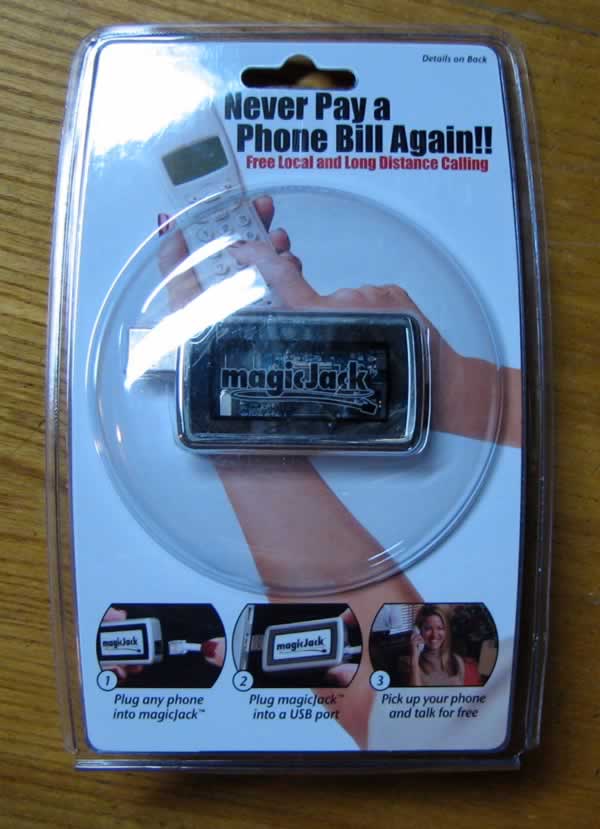
I found a coupon code ‘SUNROCKET’ that knocked off the $3.95 shipping, so I spent $39.95 total. I received prompt order and shipping confirmations via e-mail, and it arrived just 4 days later. It was shipped in a small padded envelope via First Class mail for $1.81 – very economical! See below for a picture of the unopened product.
First Impressions and Installation
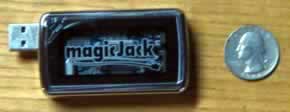
This thing really is tiny! It’s the size of a Zippo lighter. One end is USB (and thoughtfully comes with a 1 ft. USB extension cord), and the other end is a phone jack. It only supports Windows XP and Vista, so Mac folks are out of luck for now.
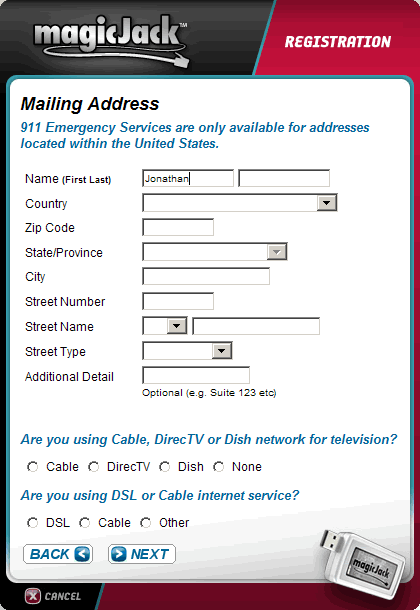
 When I first plugged it in, nothing happened. The 1-page manual said “Take it out, and try another USB port.” I did that, and a small blue light on the MajicJack turned on, and it started to self-install on my computer. No CDs required. It proceed to make sure my firewall was configured correctly, and then asked me some personal address info for 911 service and also to pick my phone number.
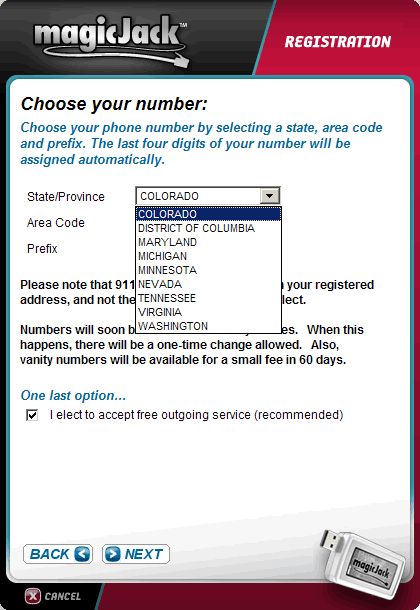
A catch is revealed! Here, I was disappointed to discover that you can only get phone number in selected area codes of selected states. Currently they are CO, DC, MD, MI, MN, NV, TN, VA, and WA (see screenshot below). Supposedly they are still adding more states and as they come along you can do a one-time switch to a new number. This should be more clearly listed on the website. 🙁 (e911 still works based on the address you supply.)
One partial workaround is to combine a GrandCentral number with this service. Grandcentral has a lot more area codes, but also doesn’t cover the entire country.
Still, in about 5 minutes I had a phone number assigned to me and was all set up. I plugged in my phone and amazingly enough, there was a dial tone. I called out… worked fine. I called in… and my phone rang. Nice! The voice quality was okay, not awesome and not awful, but that may be because I was doing this all via a wireless broadband connection. You can even switch it to work via computer headset, a la Skype.
Of course, there are negatives. You will need the computer to be on whenever you want your phone to work, so that may be annoying to some people. I also found that when I do reboot my computer, sometimes it takes a few tries to get it to start working again. You get voicemails sent to your e-mail address as .wav files, but there aren’t all of the different forwarding options and different rings that you might have gotten with SunRocket or other VoIP providers. I was also really hoping that my fax machine would work with MagicJack, but I haven’t had any successful transmissions yet.
Here’s another MagicJack review at DSLReports.
More Pictures
Summary
| Pros » Cheap! $40 a year for unlimited domestic calling! » Simple setup » …Did I mention it was cheap? |
Cons » Limited number availabilty » Must keep computer on at all times » Faxing may not work » Long-term viability is questionable » Few bells and whistles |
MagicJack essentially makes any traditional phone a USB plug-n-play phone. If you are willing to deal with the issues inherent in VoIP phones, this is a compelling product. If I had a local telephone number, this would be a slam dunk. It’s cheap enough that I’m willing to wait it out.
Another big issue is whether this sort of business model is sustainable. I mean, right now they are selling additional years of service for only $20! Can you smell another SunRocket meltdown? Do you really care if you break even after only two months? 🙂
 The Best Credit Card Bonus Offers – March 2024
 Big List of Free Stocks from Brokerage Apps
 Best Interest Rates on Cash - March 2024
 Free Credit Scores x 3 + Free Credit Monitoring
 Best No Fee 0% APR Balance Transfer Offers
 Little-Known Cellular Data Plans That Can Save Big Money
 How To Haggle Your Cable or Direct TV Bill
 Big List of Free Consumer Data Reports (Credit, Rent, Work)
Skype works best for me. I got 1 year of unlimited long distance to US and Canada for $15. $15 for the whole year not per month. Hooked up a cordless Logitech phone and I was all set. I have had no issues in 8 months of everyday use. Note: $15 was a prmotional fee it is now $30. And I got my number for $30 for the year, now $60. Even with the price changes I will renew after my year was up.
why pay when you can call anywhere in the US for free at:
http://earthcaller.com/
I almost went this route, but with the Teleblend uprising………(and as questionable as they might have been early on)………..I’ve had good luck so far. I had one outage a couple weeks ago that lasted a few hours, but service was back up by the time I got home from work & I definitely consider that (and possibly more down the road like it) to be associated w/ an instantaneous overtaking that Teleblend has decided to take on themselves.
And at approx $14/mo and *only* paid MONTH TO MONTH, I can’t knock it.
While there’s been some questions as to how MagicJack will make enough money to stick around, I guess I’m maybe a foolish optimist……….but I think they will. Maybe they’ll have to raise pricing down the road, but I think it’s a great idea and am glad to see something totally unique like that come along.
One question that I is, you mentioned
does anyone have experience on receiving calls from international locations ? If yes, is the quality of voice acceptable..and thirdly is it legal..
There are some issues I am facing with magicJack. It worked great the first few days but now, i cant make a call or recieve a call using the phone. The phone I plugged into it refuses to make outgoing calls or ring if there is an incoming call (i tried diff phones).
It works great, but I have to dial using the computer and then using the phone to talk. It’s just me having these issues. I am sure others are fine. Its great for $40, but i am having some minor issues with it.
Eh, I’ve heard bad things about the quality of VoIP…
Dear Money Blog,
On telephone numbers: magicJack is adding Rate Centers every week. We will serve 75% of U.S. Rate Centers shortly. We are giving our Beta users a one-time free shot at changing numbers when we have a full selection ready. We hope to have close to 90% national coverage by years end.
On voice quality: We are one oof the only voice device players that controls our own national network with POPs in 31 cities. There is virtually no new market entrant that can match this penetration and network control. Always either run magicFix (from web site) or check you volume settings to improve voice quality.
On sustainability: magicJack Founder and CEO both have built and sold Billion Dollar public companies. The business model and company capital structure are impeccable.
On MAC: stay tuned. Coming soon.
Thanks for reviewing the product.
For a few months I’ve been using 100% free service on my phone. You can do this a few ways, I got a linksys or sipura box, costs about 40 bucks or you can unlock your old sunrocket box, which will come out to costing you nothing, except your time.
I went to grandcentral.com, so then you get a local phone number. Then you can go to http://www.ipkall.com and get a number to convert your legacy grandcentral phone number into a SIP telephone. You get 100% free incoming, then for outgoing you just click on the person’s name in your grandcentral phone book and it will call your house and then connect you, 100% free. So no computer is required for incoming, and outgoing just use grandcentral.
You can do so many things and configure more than 1 provider on most boxes. Grandcentral and the gizmoproject have an agreement, so you can get free incoming and then outgoing you can pay 10 bucks for 500 minutes for 6 months worth, which is pretty cheap and it’s only outgoing.
I’m personally too cheap to spend a penny on something that’s free out there. The service I’m using is excellent and I think it’s better than when I had sunrocket.
You can even register at http://www.fwd.com and pick up the phone and dial a 6 digit phone number, which will call your friend/family member who has this same system. I’m making free calls in and out of the USA and free to other countries.
Since I’ve gone this way I can’t imagine ever going back to paying. I just pay for my cell phone. You can combine your tmobile top 5 with grandcentral and put a phone number you want to call free with your cell phone in grandcentral, then get grandcentral for forward to that phone number………………..then your using your cell phone to make 100% free outgoing phone calls……………….SO WHY EVER PAY WHEN THERE’S A HUNDRED WAYS NOT TO PAY.
It’s like when I hear about people who pay for AOL email or something silly. SIP technology is cheap and there’s a few free solutions and workaround.
For t-mobile subscribers, look into Hot Spot @ Home. It is VOIP for your cell phone – whenever you are within your home wireless network or another network that doesn’t firewall against it (including all Starbucks), the minutes are unlimited for $10 a month.
jbo,
There are thousand ways you can build your own home and your own car too 🙂
It’s a matter of convenience.
I should add that if you are really attached to your existing number, I don’t think you can port it over to MagicJack. Of course, if you’re attached to any number at all, VoIP may not be the best idea.
Trakin,
I have been using voicepulse for the last year or two and have made and received international calls with no problems. The prices are nice as well; $0.06/minute to Norway and less for other parts of Europe. As far as quality is concerned, I had no more problem with calls to Norway than with local calls. I would say that depending on internet traffiic, quality is somewhere between traditional landline and a cell phone.
I have been running MagicJack since 7/20/07 with absolutely zero problems. I have it set up on my XP media server that is on 24/7 (no monitor though to save on electricity) and I’ve never had to reboot a single time. I am using a DECT 6.0 Uniden three handset setup in my house and I’ve also been able to send and receive faxes using MagicJack (Panasonic fax).
I have a Las Vegas 702 area code (I am in Los Angeles) but I have a GrandCentral local number forwarding to MJ (GC voicemail supercedes my MJ voicemail and Uniden answering machine). Will change MJ to a local area code when it becomes available. I pared down my AT&T POTS line to basic service ($15 w/ tax) for emergency purposes only.
I bought one for my mother in law who lives in Asia and hopefully MJ will work fine there also for free MJ to MJ calls! (I’ve read that this works for other users who have tried it in India and SE Asia)
MJ overseas can call any US number, not just MJ to MJ
Thanks for dropping and leaving a note, Mr. Burns! Thanks for the offline tip about faxing too; I’ll try it out and update here if it works.
I just ordered the MagicJack and found that the sunrocket code is no longer valid. Too bad, would have liked to save those couple bucks but it’s no deal killer. I wish their website wouldn’t require installing software on the front page, though you can click on one of the links on top of the page to get by it.
As far as living 100% on cell phones, my family does it, although I do have one of the higher minute plans.
I ordered the unit as more of a curiosity to see how it will work out and to use when calling customer service. I highly doubt it will work in the environment I would LIKE to use it in, mainly due to the firewall restricting all ports other than 80, but we will see. If not, the kids can call Grandma more often without me complaining about all the minutes used. Anyone know if the settings stay with the unit or if you have to set it up each time you go from computer to computer?
Melvin, thanks for the update. I just tried the code last night to double-check and it worked then, I guess it just expired.
I don’t know the answer about settings staying with the unit or not.
*&%!! I just tried to verify the code myself, but since it is on the last page, if you hit “enter” it just submits the order! Grrr. I put in a request to cancel the order, I hope they catch it in time.
BTW, the code didn’t work for me either.
i am not sure but i think MJ messed up my laptop USB ports.
I wonder if there is the possibility that it is pulling too much power out of the jack if you connect too many devices, ie extensions?
Melvin, that might be a possibility with the older laptops. Because MJ also has a light bulb in it apart from other stuff that needs power. well anyway, my usb now says that there is a malfunction bla bla bla and says something about power failure when i plug stuff in.
when i put my finger in the usb to see whats wrong, some sparks appeared. i dont know if MJ caused it but it looks like it did.
magic jack is working in India. One of my friend called from Hyderabad. So Indian can enjoy Magicjack.
Well, I received my MagicJack today, plugged it in and about 5 minutes later I am up and running. More than the 60 seconds that the package says, but it did have to download updates and the firewall software tried to block it a couple times. I wish there was a Hawaii option, maybe it’s one of those 31 cities they are advertising to be here next week in August, but next week to me seems like it will be September?
Now if we could only find free broadband internet!
Just turn on your laptop and look for a “linksys” or “netgear” WiFi channel ID… that’s what I do 😉
Magic is ok. For $40 you cannot beat it. Quality is ok. My telephone # changed on me after 3 weeks of use! They have yet to fix it. Takes up some memory on your computer. So if you have slow computer and slow internet connection this will not work for you. For a secondary home or business number it is worth the $40 year. I would not use it as a primary number if incoming phone calls are important. No call foward from magic jack.
I just wish they implemented conference calling. Once I figured out that the cheapo phone I was using was picking up the radio station, voice quality has been excellent. B has started using it and for once we are on track for using less than half our cell minutes rather that going over. Another complaint is that I wish the program had a way to turn of the application gracefully rather than just having to pull the plug. Isn’t it standard practice to put some way to exit the program, even if you are going to get warned repetatively?
Just a heads up, it appears the price for the second year is going up as the price went up at the talk4free site, yet is still the same at MagicJack site.
Does anyone have caller-id with magicjack??
Martin,
All of your call made from the magicJack transmit Caller ID to the distant number. Check you Menu Drop Down to insure that do don’t have Caller ID blocked.
I have used magicJack for about two weeks with super results. I have it on at work as an extra phone line, and it’s being run by a 500Mhz Celeron, 256MB of RAM, running WinXP (an old, retired computer, brought out of retirement for MJ).
I had some e-mails with support personnel who are top-notch. Overall, you cannot go wrong with trying it.
Went from Sunrocket to magicJack/grandcentral. Been using magicJack for about a week, no problems. It’s really advisable to get a grandcentral number (grandcentralinvites.com) & give that number to everyone, so you don’t have to hand out a new number everytime you want to try a new phone service. Your grandcentral number is local to you, and will forward incoming calls to your cell and whatever other phones you have, and all your voicemail goes to one place. Sorry this sounds like an ad for grandcentral, I’m just really loving it. Makes magicJack twice as good.
you cansend FAXES for free @ http://www.faxzero.com.
I installed majicjack a couple of days ago. It works reasonably well, but siince I installed it I am not able to hear sound with videos–such as those from youtube. Any ideas?
My blue light no longer comes on and I’m unable to use my phone. I can make calls from the computer using my mic; but It no longer works with my phone. I’ve plugged it in to different USB ports with out any luck. I’ve rebooted my computer and It shows some type of error that I must by pass….any suggestions to fix this problem. Thank You
i got the magic jack a few days before and worked for just 2 days. although the majic jack opens and all that after booting i am unable to make any calls or receive any calls. can any one suggest wht went wrong in 2 days?
Try the following if your magicjack is not working. Since it is plugNplay USB device. Just like any other device.
– Try unistalling the software from Add/Remove programs in Windows
– Right click on the USB icon in the right corder of the taskbar and select magicjack usb drive and select to remove it.
– disconnect the magicjack usb from computer and disconnect the phone from the magicjack usb and restart your computer.
– Login back to your computer, try to plug the magicjack usb to different usb port of your computer, one the program is installed successfully, try to connect the phone to magicjack usb.
– Still having problems? Call or email the magicjack customer service. Their customer service sucks…
I am truely frustrated. Help!! I purchased the MagicJack because like the CEO Don Burns said they have added a lot of area codes and I have a Metro Atlanta number now. I have successfully used my Magic Jack for one day via my wireless connection to my cable modem. However, I have tried all the trouble shooting recomendations from the MJ website and no matter whcih machine I plug MJ into it bounces back between error 3 and error 401. The MagicFix says everything is OK, but MJ still doesn’t work. Man what a disappointment. I was hoping MJ would be my way of helping everyone I know to break free from TELCO HELL. I ran into an older gentlemen last night at Wally World and his son is still paying AOL HELL $35.00 a month. I gave him the info to break free via AT&T DSL Direct (Nake DSL) which is now 100 availible in the old 9 state BELLSOUTH territory. Sorry, to flip subjects slightly, but like JBO stated way back on Aug. 24th I am keeping all my options open. Got to cut costs and my Vonage has become a little unstable and I can’t pin it down between my Comcast service burbing, or my NetGeear Router sucking wind (N-series) or the new stand-alone Vonage phone adapter being crap. So any suggestions is appreicated.
To KLGJR, I believe you need to login to your firewall settings and make sure to allow all traffic to pass except DNS, and NetBIOS
I kept getting error 3 as well and checked everything under the sun until finally I lowered my firewall settings and seems to be okay now.
You can also go to this site to test your VoIP: http://www.testyourvoip.com/index.html
Good luck
To Dan:
FYI, I turned off my firewall and my anti-virus programs and still got the error 3 and error 401. So I am going to take it to a new extreme.
I am going to rebuld my alternate desktop machine with Windows XP w/SP2, but I am not going to install any 3rd party firewalls or anti-virus. If it works then I will troubleshoot backwards with MJ tech support to figure it out. Thanks for the suggestion.
KLGJR
I am also getting the same error as KLGJR, since the magic jack made some maintenance on 11th 8pm EST. the error message is “please restart your magicjack and try again [error 401]” some times the error 3 also popups. I dont think there is any firewall issue
I bought my MJ several weeks ago. It is terrible. I can hear p600erfectly, but everyone I call complains about lousy audio, so I have to use my cell phone. This product seems to work for lot of other people, but it’s rotten for me. The big problem is that you cannot talk or communicate in with any person at Magic Jack. No customer support of any kind. As such, this thing gets a grade of F-. A total waste of money.
travis t600@msn.com
I have one MJ and it works very good. The only question is… If it gets damaged can I replace it with another unit for 1/2 the price and keep the same number?
I have WASTED so much time getting this work. I am an advanced computer user. You make one call fine and then 30 minutes of rebooting and other issues. FORGET gettting it to work at all with Vista. It does NOT keep a connection. TOTAL WASTE OF MONEY — Wish I never heard of them. Since is less than beta, they should have given it to us for free.
Do not waste your time or money on this.
I had the error 3 issue. Went through 2 frustrating calls to customer service. Then had one of the real brains call me back and it was resolved in 2 mins (needed to reboot my DSL modem and router). BTW, Avast works fine as an antivirus with Magicjack AND it is free for home use!
I have magicjack it does not work anymore,I have the phone number,I tried it on two computers,I also used two different phones. I can’t get the solfphone up on my screen anymore. I would like to kept it only if I can getr it to work again.
Thanks for the info! I was about to purchase MJ… It’s not worth the headache.
I just wanted to update everyone that my Netgear RangeMax NEXT Wireless Router Gigabit Edition – Model #: NTG WNR854T100NAS just gave up the ghost after 4 months and 20 days of use. I replaced it with a Linksys WRT350N router and my Vonage and my Magic Jack are BOTH working where they both were having issues before. I ran the “Magic Fix” and it updated the java code on my Magic Jack device and everything is back to square one. So if you have a Netgear Router of any kind it may be causing you untold grief. I am now going to use my MJ all the time to see how reliable that it is. If it holds up I will get another so my daughter can call us from her college using a local phone number……
can someone invite me to join grandcentral my email is uberdesignchic@gmail.com
With a magicjack, if you do not have a local #, will people calling you locally be charged long distance.
“With a magicjack, if you do not have a local #, will people calling you locally be charged long distance.”
Yes.
—
For the curious, I have stopped using my MagicJack completely. It would require the occasional reboot of my computer, and that was too much hassle when I could just keep using my cell phone. For $40 I suppose it was worth a shot, but I wonder if I can resell it on eBay…
Response to bgeisert
For sound on Windows XP–go to:
Start
Control Panel
Sound, Speach, Audio Devices
Sound and Audio Devices
Click on the Audio Tab
In Sound playback area, click on SoundMax Digital Audio or your sound maker
Hope this was helpful
Thanks, Jonathan for the info.
Magicjack is not working
I had it working for 1 day, then moved it to another computer and it stopped working
It is not recoqnized by computer,can ‘t see it in windows explorer!!
it is as if its no a USB device, i have tied almost everything
I was looking to get a USB driver for it, but customer support is useless..can someone help
Sandra,
Thank You! Sound was driving me crazy with You Tube
I also have magicjack,It worked for one day only,There is nothing that you can do.I would have liked to be able to speak to some one,how ever,We lost the fourty dollars.I hear some one is going to the better business people,however you can not trace them anyway.
Who can one place a complant with?
HI joe:
Well, I purchased mine with a credit card–and if I don’t get a refund–I will put it in as an unauthorized charge–they can track them from there. Believe me–they don’t want to start messing around with the credit card people–they can garnish their account–they do it with other people that owe them. AAaaaaaaaaite.
sandra
I got this after using skype and love the advantage of using my phone with it instead of purchasing an expensive VOIP phone. The quality is great much better that skype and I can have phone number with all the great features like voice mail, 911 service, and caller ID. No one offers this full service for this small of a price. I am using this as a second line for my part time business. The only issue I have is the limited area codes they have to offer, hope this get better in the future.
Got my MagicJack yesterday. So far I have spent alot of time trying to get it to work-5 technical chats. I was advised to remove all music software. And also to uninstall all virus software (disabling wasnt enoughj they said) Now my computer is minus much software and I cannot get any web based email up-gmail and hotmail web pages will not appear. I can surf the internet though. Oh…one more thing MagicJack does not work !!!
I have had MagicJack for about 45 days. Other than an occasional reboot issue in which I had to reinstall the MagicJack software, no real major issues. I have four extensions hooked up to it with no problem. I have had it on a wireless access through a notebook (worked OK) and through a pc directly connected to a router. Call quality is OK, not great, not bad. There are issues using the keypad for automated stuff (press 1 etc) so we just use cells for that. Overall $19.95 compared with $600 to AT&T, I am more than willing to put up with some idiosyncrancies.
To Bill
Your welcomed
had it a day now it works,friends who have it says it works.just the area code issue now. keep those good response coming in.what about free cable instate and internatoinal tv.
this piece of Magic Crap will be gone before the summer !!! I am investigating ALL of the “inventor’s” rip-off’s including Dan’s 20 million dollar house (worth half now. LOL) and his IRS ‘situation” regarding his dealings. Remember 10-10-2-20 ??? That is another product from this SCAM artist !!! If you want to get on TV I am gathering several unhappy ex-customers to visit his “castle’ in Palm Beach. I live on ft. laud bch., and my email is schafe1001@aol.com if you would like to BE HEARD!!!
The way you “should be” heard according to this SCAM BOX !!!
Watch him bragging on YouTube video about how much he is making on “hedge funds”….notice the market was at 10,000 then…….I believe HIS BIG MOUTH has COST him a pretty penny and WE shouldn’t buy his lousy product to BAIL him out !!!! Sorry, Dan the inventor, the people you ripped off will be seeing (and suing) you SOON !!!
I got my MJ in Jan 08. I did not like it,so I sent it back. I tried to contact customer service. But they are just giving me a hard time. I want my money back. It’s going on three months. I guess it’s time to contact the BBB. Dan the inventor SUCKS
Hi nikki
I ordered Majic Jack in February–sent one back and they received it on March 5, 2008–they didn’t return my money to my credit card until I got the BBB and my credit card people on to them. Finally on March 21, 2008 they returned my money–dag–their customer service sucks biiiiiiggggg time.
I will never buy another product from them again–trust me
I got mine earlier and just had a chance to try it out and so far I am very happy with the quality. The install was pretty easy with minor issues at first, mainly my fault. Anyways incoming and outgoing calls from my phone works like a charm. Audio quality so far is great, but I only tested calling and leaving a message on my cell voicemail. Overall I am very satisfied, I don’t have a landline and only used my cell and now I actually have phones in my house. There is one downside, my area code wasn’t available and I had to use a different one, but apparently MJ allows you to change your number one time for free so when it becomes available that’ll be the first thing I’ll do. Just so everyone knows, I am using XP, DECT 6.0 phone system, and cable internet on my secondary computer that is always on.
WARNING. I got my magicJack in mid Jan. 2008. Quality of sound and connection was terrible. On Jan. 27 I asked for RMA number and returned unit Jan. 29, 2008.
As of today Apr. 02, 2008, still no refund. I have asked for response many times with no results.
Recommend NOT to deal with unethical type company such as this.
i tried it for a week and sent it back the price ws good it installed fast but thats it on the second day no voice mail no 911 every one i alled complained they could not hear me this is worse than vonage and thats bad the tech people read from a book when you chat on line with them and nothing they tell you works as with anything brand new it would be a good idea to wait till the get the kins out of it before jumping in
Contrary to all the bad comments here, I am a low tech type person. I ordered a MJ, received it priority in 5 days 3/31/08. Installed on 3 different xp machines. All working, all voice quality I am told if cell phone quality or better. In all cases I attached a conventional wireless phone to the MJ and use a conventional headset with each unit. If a call doesn’t work, I just hang up and redial. I find many more local numbers including my smaller town than there were available a few months ago. I think they have improved many of the conditions cited in 2007 and in the early beta stage. Pleased so far. The trial is free minus postage.
After testing it out a bit, I can better give my opinion. For me, the incoming sound quality is very good and outgoing quality is adequate to good. The downside, it needs a pc to be always on if you want to use it as a dedicated phone to know when incoming calls are coming. You also need a very fast broadband connection and I use the fastest Comcast provides residential. Even with broadband your download may be fast, but upload may be slow and with VoIP technology you want upload pretty fast aswell. Another problem I had using this device with wireless, it kept disconnecting from the internet so I had to connect my desktop directly to my router which fixed that problem. For me, this device works great. I never needed to contact thier support or tech and from what I read, I hope I never do. Also this is VoIP like Skype and Vonage and they all have similar problems people don’t realize, so unless you know you have pretty fast broadband with fast uploads and know what you’re getting into, then I wouldn’t recommend VoIP.
I wish to return the magic Jack as I do not habve fast Internet but only dialup which is too slow for this service. Thank you and Please send return instructions via Email.
Sincerely,
Eugene Castanier.
Bought MJ a week ago to use as a phone service for a small startup business. So far I’ve been experiencing a number of problems. Voice quality is variable; sometimes good, sometimes virtually inaudable. Voicemail is completely unreliable. Their troubleshooting site claims they are upgrading routers and firmware and that for the moment the system is down. They say “Please be patient” but no word on how long. I’m going to give the MJ another week or so of trial and if reliability doesn’t greatly improve I’ll have to return it. It’s too bad because it’s a great idea. Unfortunately I think they have yet to get the bugs worked out and have grown to fast prematurely.
I just signed up to get my free trial magicjack and will post my updates later
Hey Mr. Burns, heard from the IRS yet???
I can’t wait till the BIG SURPRISE Don; I hope you are ready to “reap what you sowed”………..
To Tony re: your refund
I have many people with the same problem getting their money back from “honest” Don Burns the inventor. Anyway, I live on Ft. Lauderdale Beach and am getting a permit to protest on his 20 million dollar mansion in Palm Beach and will have at least 20-30 people with BIG SIGNS for the “bored” MEDIA in Palm Beach to get on the local 11pm news about this “situation”. I also “hear” from a RELIABLE source that this man has IRS problems as well–> not hard to believe when you read about his “trickery” in biz. Let me know if you still have not gotten your money, that way you can be represented if you can’t come protest in person. BTW, he lives in a very nice neighborhood and that is why I am getting a PERMIT for this. THE MEDIA WILL SHOW AND TELL, you will get your money back !!!
# nikki says Says:
March 31st, 2008 at 2:43 pm
I got my MJ in Jan 08. I did not like it,so I sent it back. I tried to contact customer service. But they are just giving me a hard time. I want my money back. It’s going on three months. I guess it’s time to contact the BBB. Dan the inventor SUCKS
# svirgo1 Says:
April 1st, 2008 at 10:40 pm
A PERMIT TO PROTEST ON HIS 20 MILLION DOLLAR HOUSE IS IN THE WORKS. HE LIVES IN PALM BEACH AND I AM IN FT. LAUD. BEACH.
IF YOU CAN’T MAKE IT THERE, LET US KNOW YOUR NAME AND PROBLEM. WE WILL ADD YOUR NAME TO A LIST OF OVER 100 NAMES THAT HAVE BEEN ‘RIPPED OFF’ !!! THIS WILL BE ON THE LOCAL 11PM NEWS IN THAT BORED AND SCANDALOUS NEIGHBORHOOD. NOT TO MENTION SOME ONE WILL CALL THE POLICE (( hope !!)
# les Says:
March 21st, 2008 at 1:09 pm
Got my MagicJack yesterday. So far I have spent alot of time trying to get it to work-5 technical chats. I was advised to remove all music software. And also to uninstall all virus software (disabling wasnt enoughj they said) Now my computer is minus much software and I cannot get any web based email up-gmail and hotmail web pages will not appear. I can surf the internet though. Oh…one more thing MagicJack does not work !!!
SO TRUE !!!! My email is schafe1001@aol.com if you are looking into getting on the local news about your experience.
Marc Schaeffer,
Computer Tech, LLC.
WHY WOULD SOMEBODY PERMANANTLY REMOVE “GOOD” SOFTWARE TO FIX A PIECE OF CRAP? DO NOT REMOVE YOUR MUSIC SOFTWARE TO INSTALL THIS ”JUNK”// jUST QUICKLY GET A REFUND BEF0RE THEY ARE OUT OF BIZ !!
Hi:
I just want to say that Dan Barislow is no longer the owner of majic Jack. I think he sold it, it’s another guy who bought it, I can’t remember his name–he is the CEO or something like that. Dan is just the inventer..do some research before you go and protest on his property.
we received our magic jack and have had nothing but trouble and by that i mean we have wireless internet and it keeps booting us off line so the call doesn’t go through and most of the time the phone is garbled with static. we also have a phone number that is for chicago are but we don’t live in chicago. just hope someone can figure out how to fix these problems because it sure is a nice thing to have.
To: Susam Fiscus:
I have had my MJ since late last year and had NOTHING but problems with it until I determined that my piece of crap Netgear N Series Router was causing ALL my problems!! Once it died and I replaced it with a Linksys 350 N, I have NEVER had to reboot it yet and my MJ works every time!! So before people go off the deep end, you need to try your MJ device on a machine that is hard wired to the internet connection aka patch cable then if it works with out a problem, then try connecting the MJ to a machine that is wireless. I use my MJ on any of my XP sp2 laptops and it connects to my router via wireless again no problems. Magic Fix correct just about any problem. I agree with Marc S from Ft. Lauderdale on one issue. This product IS NOT ready for PRIME TIME so unless you are willing to put up with the bumps in the road DON’T BUY THIS PRODUCT!! However, if you can deal with a “beta” product then I say go for it.
I received my MJ up here in the Leaf Nation and it installed on an XP SP2 machine in about one minute. It even upgraded during the install process. Ingress and egress calls have been working wonderfully with no “chirps”, “crackle” or annoying delay (actually the delay is so short it is not really noticed). It exceeded my expectations, and the voice message system works as well or better than many corporate systems. Voice messages are also emailed to me which is really sweat. Only once did outbound calls stop. I kept getting “three beeps” … I think that is some sort of connection error. Anyway, I reset my router and it hasn’t happened since. My experience has been excellent. I have made wonderful uninterrupted connections to friends across this great continent and border. My sound quality is better than mobile, and sometimes as good as a land line. I expect the product and/or service to simply improve over time. I hope my good experience continues.
Hello All,
My name is Jim and I work for magicJack. I’ve spent some time today reading the comment thread and would like to share some perspective from the magicJack team.
Dan Borislow has spent the last 4 years of his life and has invested his own $$ in the development of the magicJack and into the phone network (certified CLEC in 50 US states) which supports magicJack phone calls. Dan’s primary objective for inventing the magicJack was to SAVE people alot of $$ on their phone bills while also providing the magicJack user a call quality experience which they’ve grown to expect from their phone company. The entire magicJack team is laser-focused on improving the entire magicJack product/customer experience and we’re working countless hours to make enhancements in all areas of our business. The magicJack was launched at the Consumer Electronics Show on January 7, 2008 — which is just about 100 days ago. In the near future, Dan Borislow will be issuing a ‘magicJack 100 Day Report Card’ which will provide our users with an overview of the achievements we’ve made to date and will outline areas where we realize we must continue to improve. Over the last 100 days, we’ve been widely embraced by our growing customer-base and have received great praise from many Tier 1 media outlets, technology experts and consumer advocates. We are most grateful to our satisfied customers and to all supporters of the magicJack. On the flip-side, we also recognize that any product which revolutionizes an industry or includes paradigm shifting technology is subjected to some early-stage detractors. There are a few examples who have posted on this site. To these folks, I pledge that we will continue to strive to make improvements on our product and our overall user experience — and, perhaps along the way we will win your favor — all the while, our goal will be to continue in our efforts to
build a loyal customerbase with our money-saving product.
A few historical points that need clarification: Dan Borislow was a pioneer in the competitive long-distance business in the ’90’s and his previous company saved millions of people $$ on their Long-Distance bills. His company was awareded the coveted JD Powers Award for Customer Satisfaction. Dan’s goal is to win the Award again with the magicJack.
I will post the ‘100 Day Report Card’ soon.
Best regards to all.
Jim D.
My MJ has been working flawlessly for 15 days now. I’ve installed it on 3 different computers and it only balked at one because I had the security settings wrong. Once this was straighted out I can move it between all 3 computers and it is up and running in < 60 seconds. It forwards calls, captures caller IDs, and sends voice emails exactly as I set it up. Maybe I’ll get a surprise later but for now I’d like to believe Jim D. above. By the way, before I used MJ I had Vonage and I thought Vonage was problematic and causing lots of problems on my comcast broadband cable system. It turned out that comcast discovered that my cable connector at the trunk line in our apartment building needed replaced. Haven’t had any problems with Vonage, Cable, or MJ since. Of course I’ll be dropping my Vonage if the MJ keeps up the good work it is doing now.
I bought the MJ waited for 8 days. When it arrived I tried it on VISTA with no luck. Outgoing calls work fine (sometimes) but incomming didn’t work at all. Rx’ing end could not hear me at all. I tried it on 3 other computers both XP and Vista and 2 different networks with 4 different phones. NO GOOD!!! I spent 3 hrs online with customer service and they all had me doing the same thing. They have no idea what to do either. MJ might be a good thought but its a P.O.S. DONT BUY IT!!!
Would you like to sell this product to Spanish speakin people?, there is a great market out there, I can help, please contact me if you are interested.
Sincerely.
Hector Gomez
Mobile 626 506 5291
I’ve bought MJ two weeks ago. I sent to my wife abroad US. It’s easy to install, not problem with XP SE. She can hear me properly but I can only hear her in a very low volume. It was not possible to solve the problem from control panel, audio device. I have a very fast internet connection. This problem makes MJ until know useless for me. I haven’t received any answer yet from technical support.
I read that this problem have been experienced by many user.
Any advice will be appreciated at danielarduino at hotmail.com
Thanks
I’ve bought MJ two weeks ago. I sent to my wife abroad US. It’s easy to install, not problem with XP SE. She can hear me properly but I can only hear her in a very low volume. It was not possible to solve the problem from control panel, audio device. I have a very fast internet connection. This problem makes MJ until know useless for me. I haven’t received any answer yet from technical support.
I read that this problem have been experienced by many users.
Any advice will be appreciated from anybody with a simillar problem at danielarduino at hotmail.com or in this site.
Thanks
Mr Jim D.
I’m a user of MJ. MJ sounds like an excellent product. And I agree it could be revolucionary. But I have the following problem without solution.
I’m using Window XP SE, everything looks great wiht MJ. But the person receiving the phone call is leasing the voice extremely low.
MJ allow to increase the volume of the speaker but not the microfone. Could your company improve this problem or solve it with and upgrade of the soft/driver?
From Control Panel Audio Devices is not possible to solve the severe inconvenience.
I tried to contact technical service without answer yet.
Thanks
Sergio A.
To Sergio:
Try adjusting or see if your mute button on the XP speaker panel is checked muted. If not just turn up the volume. Yiit-di-deee!!
Thanks Mslaprada.
I’ve already checked it. I think is something different.
MJ like Skype; should have the possibility to increase the volume of the microphone not only the speaker volume.
But I appreciate any suggestion to solve the problem.
I ordered 1 and before I knew it, got an email confirmation that showed they were sending three unless I replied and made changes. Replied right away to correct it and was told it had already been sent. The main problem now is that they went ahead and charged my account for a whopping $59.85 that I did not have and that has put my account over and I’m pissed because I only decided to try their offer of 30 days free after which you’ll get charged if you decide to keep it. They are not helpful at all by email and I need to speak with a real person. I got the product in 4 days and refused it without opening it and have also created an RMA ID # but have not yet heard from these people. I really smell fish because these people are prying people’s hands open and forcefully taking their movey. Otherwise, why do they have such poor customer service. Can anyone please give me the customer service contact number for Magic Jack?
I don’t the real information in front of me tonight. I will search my records and get you the contact information I have. My first suggestion before you do anything else is to contact your credit card and dispute the charge immediately to get it reversed. If you used a Bank Debit Card then get the local branch of the bank that you use and sign the paper work to get the charges reversed and your account restored. Make sure you speak directly to your branch manager to make sure the bank understands how urgent the situation is as well. Also, when you get time you need to contact “Clark Howard” the national consumer action talk show host. He will want to know how you have been treated as well. I will get back to you as soon as my schedule allows with more information. Call Clark Howard!!!
Thank you so much KLGJR. I appreciate the information and I have contacted my bank and they advised that since I returned the merchandise I needed to wait and find out first if the merchant has gotten it back and thats why I need to contact them directly by phone because they are not responding to my email. thanks again, I will wait for you to get back with the rest of the info. Please how can I contact Clark Howard?
To Stay @ Home Mom:
You can reach Clark Howard at his website…http://clarkhoward.com/
You can call the Consumer Action Center @ (404) 892-8227. Tell the person you talk to the situation and see if they will priortize your situation to the front of the line and get you on the air with Clark. Also, if you did not request the additional items (MJ’s) you have every right under Federal Law to dispute the charge and have it removed from your credit card or your money returned to your checking account since it is FRAUD. Let me know how it goes from there. I will let you know when I have the contact info for Dan B the inventor of MJ. I only have 900 emails to search through. Please stand by.
KLGJR
To Stay @ Home Mom:
Here is an email address for Dan Borislow the inventor of the MJ.
DBORISLOW@aol.com
He answers pretty quickly to this address. So raise your concerns to him there and hopeful you can get resolution. Thanks
KLGJR
okay,so ive been reading about this,and i have seen it on t.v., but no where can i find a contact number,so i can call and ask questions,does anyone know if this would work in iraq??or if you know of something that would?? this would be geat for my husband,but i need details,or a contact number,its really irritateing not being able to talk to anyone to find this stuff out!!! thanks!!!!!!
MAGICJACK.COM INSTRUMENT AVALIABLE TO INDIA TO INDIA CALLING
Thanks KLGJR, you have been really helpful. I have contacted my bank and was advised to wait and find out if the merchant has already received their product that I refused and returned to them with an RMA ID#. I had a chat with one of MJ cust. service and he told me that as soon as they got it back, I would have my money returned to my account in 2 days and this was last week Wednesday. It’s been a week since I returned the package and they should have gotten it by now but I haven’t gotten my money back. I will send an email to Mr. Borislow and see what he says after which I will then know if I should go ahead to file a dispute. My bank will take care of it but they just need to know first that the merchant is unwilling to return my money before they can take care of me and then go after the merchant. Thank you again.
To Stay @ Home Mom:
Did you also try to talk to Clark Howard??? I think he would be interested in knowing about you situation and not only how MJ people treated you, but also, your bank. Take care and hope it all works out soon.
KG
To: Nichole:
The answer is maybe. It depends on what computer network your husband is on. All it takes is a computer “firewall” to block the traffic between the MJ device and the MJ Central Office and it will give you nothing, but failures.
Here is the email address to the MJ inventor, ask him directly:
DBORISLOW@aol.com
KG
I bought a MagicJack and experienced problem after problem with it since. First, it arrived 30 day later and never worked properly. Moreover, I have lost about 20 hours total chatting with them without any results. Secondly, they refused to replace it, even though they admit it is defective. Thirdly, they refuse to give me back my money.
If I can recommend 1 thing to everybody that reads this, it is to stay away from that company and its products.
I stumbled unto this forum trying to find a fix for my MJ. Mine works fine, I can make calls, receive calls, and send/receive faxes, ONLY in the first 10-15 mins of when I restart the s/w. After that first 10-15 mins I get the message “Please connect to the Internet, and double click here [error 4]”
Well I have opened the ports, turned off all anti-virus/firewalls, changed my Preferred DNS server address. I’ve even changed computers. I have two of these MJs and would like to get this going, as everyone has ran into with MJs support (sucks) they have no answers.
any help?
My MJ is on the way for my free 30 day trial, but it sounds like my phone has to be directly plugged into it. Is that correct? My lap tap is wireless which will be kindof pointless if it has to be connected to a phone all of the time. Not to mention I have phones in different parts of my house. Will they be useless? Any suggestions would be greatly appreciatd.
To: 71k21b
What is your home network configuration??? What type of broadband connect are you using and what brand of router. It does make a difference!!! Let me know.
KLGJR
To: hmboj1976
Same basic question to you about your home network configuration. Your configuration determines where you plug in your MJ. Let me know. Here is a sample of my home network configuration.
I have a Windows XP w/SP2 laptop that I plug my MJ in to the USB port and I am connected to my broadband connection via the wireless nic of my laptop and can use my MJ from that point on my home network or I can plug my MJ into my desktop workstation and use the rj11 wiring in my home to run the phones all over the house. I have Vonage on my primary connection. I have MJ as a test since I have one child going off to college and one going back to IRAQ and I want to connect to them with a local phone number!!
To: KLGJR
I have WinXP Pro SP3, connect to Embarq ADSL via: ZyXEL p-660r, have nothing eles connected to this connection. Here is a link to my modem/router http://www.zyxel.com/web/product_family_detail.php?PC1indexflag=20040812093058&CategoryGroupNo=C8A3A230-907F-4CA8-9C3B-3A84F5A06405
Regards
Brad
does that help?
OK. Well, I have an inspiron 1501 Dell, my wireless router is belkin 2.4ghrz. I don’t have another computer. I have cable internet. I’m wondering if I can plug the phone line from MJ back into the phone jack in the wall to send the signal through the whole house. It’s not a deal breaker. It would just be nice. I read an article with the inventor of MJ which said he has no plans to make it directly compatible with a router which would have been awesome. I guess My wireless computer is going to be tethered if I want phone service:(
To Brad (71k21b):
I used to get the kind of messages that you are explaining when I had a Netgear Router N Series Router. When I switched routers to a Linksys ALL of my MJ problems went away. For you and the other folks on this blog I went back to my notes and found my reference to the “unofficial magic jack forum, however, I am seeing that some one has planned spyware on the site so I am not going to give out a URL that could come back to bite anyone. I do suggest that any one with a MJ issue to go to the http://www.dslreports.com site and look for the forum for Magic Jack on that site. That forum should be clean. Let me know if you have any other questions.
To hmboj1976: Let me know if you need any additional info as well.
Thanks
KLG
To KLGJR:
I have a Linkys Router and I had all the problems possible with the MJ. I also tried a D-Link Router and the problems were the same. This product does not live to its promise.
Furthermore, they advertise for 1 Full Year of Free Long Distance. When the MJ does not work, they do not provide that service and they dont live up to their promise.
When you chat with them, they make it clear that their product has NO GUARANTEE WHATSOEVER. But then it is too late because you have fully paid for the MJ.
If they would make it clear on their website that they do not guarantee their product and that we buy the MJ an our own risk, nobody would buy it.
Now I realize that I have been taken.
It wont happen again with MJ.
Update:
I found what was causing my error 4 with my MJ. I’ve also done some test with F-secure software that was provided by Embarq DSL.
First things first, what was causing the error was a voip program that I have been using to play games online. Its called Teamspeak. If you or anyone that has this running on the computer that you have MJ running you will receive error code 4. I haven’t tried Ventrilo which is another popular voip program for gamers.
You can use F-secure on normal status if you want to use MJ. The only thing that will hinder your MJ service is the Content Controls, which will also give you a error 4. I suggest to leave this disabled.
I will make an update if I find anything else the makes MJ hiccup on my system.
Regards
Brad
I ordered the Majicjack on a Monday night and received it Friday, not bad I paid for the rush processing. Hooked it up on a small computer I have that’s hooked to my TV set and had problems with it. I think that the USB port on the machine did not have enough power and failed to run it properly so I hooked it on my main computer and it worked perfectly. I only have one big complaint about this company it was supposed to be a 30 day trial and they charged my credit card the day I ordered it, that is false advertising and is just bad business. All I can say is the product does work but if they can’t afford to give 30 day trails then for heaven sake don’t sucker people you will get many bad post’s online and people will get turned off. Don’t think another company will not take your business because they are already planning on competing and they might do it the right way.
I took the free trail and found out it was not free the magicjack don’t work and they charged my card before the 31 days , they took the money right away and cost me more an overdraft now thats a rip off they said only $4.00 was being taken off but they took $50.00 instead. i can not return it because they cost me $100. for the thing and it don’t even work at all. MAGICJACK IS A RIP OFF
To Wendy:
I understand that you are mad about the overdraft, but not having the funds in your account is not the people at MJ’s fault. If you post what errors, if any, and your system configuration we maybe able to help.
I too had problems at first, but it was software running on my system that was causing it to hicup.
As to a rip off: how could you call a phone system that only cost 39.99 for the first year and 19.99 for each year after a rip off. I mean really?
Brad B.
I’ve had MJ since May 5 and it has been flawless. I use it primarily for home use and I fully intend to keep it. I replaced Teleblend with it as they couldn’t get my dialtone back. [Beware when cancelling with them, they will leave it on til they use up what you have paid for instead of giving you a refund.] I have my MJ plugged to the house system and use 4 phones very well. We are having to get used to dialing the A/C!!!
I talked to a representitive by Live Chat and was told that “error 3” is usually a problem with being behind a firewall.
If you are behind a network/external firewall or router, you need to open the following ports: UDP 5061, TCP 80 and TCP 443.
If you do buy a couple of Magicjacks, buyer beware about their shipping rip-off.
They do not honor the receipt they show you at the time of purchase.
When you buy two or more units your receipt will say one thing, but the actual bill on your Credit Card will be higher.
This is documented fraud exercised by this company, but since its “only” $6.95 per order, no one seems to care.
Since they have no Customer Support phone or EMail address, you cannot contact them about this type of problem.
Your only recourse is to go through your Credit Card company and demand a refund….not exactly a painless thing to do.
Like I have seen elsewhere…wait for a legitimate company to run with this idea.
Remember; to use this, you must already be paying for the Internet.
No one should be thinking this wasn’t a foreseeable device, just like Email is to Postal Mail.
Everyone was shocked at the notion of sending “Mail” without paying for a stamp.
There will be better thought-out products soon (like one’s that don’t need a computer) that work the same way.
I was not told when the 30 days is up and how much my credit card will be charged. I also did not know that windows 2000 was not reccommended. I would like some contact as I think this is a good product.
I knoticed others had this problem too. We installeed magicjack a day or two ago, and since then Our sound isn’t working for the interne. I can listen to My windows media player, so it’s not the sound settings on my computer, but youtube, crunchyroll, all of my TV sites, none of them have sound.
Ideas on what happened? Solutions? (dear god let there be solutions)
Nevermind my sound problem. I was reading through the comments and saw the answer to my problem. Sorry to take up space.
Thanks Sandra, it worked.
Dear Donnelle Myers
Your very much welcomed, glad I could be of some help
Re: Majic Jack Complaints
Email your troubles to: DBORISLOW@aol.com
Hope this is helpful
Hi – I purchased magicJack a few months ago and it’s been working fine. Phone quality is decent (for the price); however, I did get annoyed by the popup window that dominates the desktop when someone picks up the phone or calls.
To ease the annoyance, I made a small utility to block the popup window. magicJack still works normally and you can quickly enable the softphone (popup window) if needed.
If your interested in giving it a shot, it’s freeware and available at download.com (search for “MagicBlock“).
🙂
Regards,
Jeff
I read all people’s reviews on magicjack phone service, and I understand why folks out there got some sort of problems with this service. I have magicjack for over a month, and I don’t have a single problem at all. Here is what I highly recommend.
Install magicjack on fresh built machine only. This machine should only have windows XP with no firewall, no anti-virus, no games, no unnecessary applications. Note. Windows XP has built-in firewall. Make sure turn it off. Also, this machine is used ONLY for magicjac phone, and it must be hard-wired connect to your router/switch. If you need to use computer such as web browsing, word processing, game, please use different computer.
I guarantee it will work just fine if you guys do that. You can email me at nguyencpp@yahoo.com if you want.
This works great! Saving us on phone charges for our customer and us. Call us to see the voice quality.
Herschel Everett
magic jack is sporadically at best
customer support is a joke
LOTS OF SHILLS IN THESE FORUMS
UNABLE TO CONNECT HALF OF THE TIME
I have had nothing but a wonderful experience with my MagicJack right from the very minute I opened my package up to even now. It has lived up to (every single statement) that was mentioned in the advertisement on the website and on the TV infomercial. It was ABC to hook up. It was so so easy to follow the directions and fill out the registration, activate with my code and choose my phone number. I was making my very first phone call in a matter of minutes to my husband and he made a call right back to me with the phone number I picked to be our new phone number. We both could hear one another clear as a bell. No background noise what so ever. No cutting in and out at all. Loud and clear. I have windows XP pro, running on a pen/4, a nice high speed Internet of 6MG and 1000 ram. I love the fact that I can switch from my hand set over to using my microphone on my desk top and hear with my speakers to have my conversation hands free to type and just as clear as if I had the hand set right to my ear with one click on the MagicJack menu on my desk top. Love that I am able to add my important names, e-mails and phone numbers right to my MagicJack address book on my desktop and just click on that persons name and it calls that person with one click of the mouse. I love the do not disturb feature and I’m busy feature. The voice mail service is a cinch to set up and extremely easy to use. It will even send a e mail with who ever sent you a voice mail to your e mail address along with the audio message for you to hear through your windows media player. How handy is that! I can’t say enough nice things about my Magicjack. I LOVE IT and would highly recommend it to anyone that is looking to save some money that always uses a high speed Internet connection and uses the phone quit a bit. Today’s day and age. This is the real deal at a low low yearly price and I’m elated I made the choice I did and bought this little handy gadget and two years of it’s service. I hope to have many more years of service to come there after as well. Thanks MagicJack! YOUR THE BOMB :o)
i am disgusted with this MJ they are taking us by whatever means to achive their goals, can any one help us.What everMagicjack you own we need the consummer dpt involve, there are no live person on the phone to connect or speake to.i am tired of this dam thing it does notwork .Consummers do your home work we are being taken for a ride.FEAD UP
To: Monica Simmons
I understand your frustration. However, no one can help you with your problems if you don’t give some type of error message. I have had my magic jack and yes when I first got it I had nothing, but problems. However, once I determined that my problems were not caused by my magic jack I fixed those issues along with running all the suggestions that were given to me. My Magic Jack is running very well and I have loaned to three other people that wanted to try and it worked the first time for each of them. I now have my Atlanta based area code Magic Jack with my 78 year old father in Va Beach and he talked to his 86 year old sister for almost 30 mins last night. So I am leaving it with him to give him unlimited long distance. So again my suggestion is that you document you problem and review the messages here to see if others have had the same problem.
Thanks.
KLG
*Just an update*
After fixing my problems (that was not caused by magicJack) my magicJack has been running very well to. I have bought 10 so far and giving them away as promos for my website. This has been a great service so far and I think that I might be buying another 5-10 more for my friends and family.
Cheers
Brad
I purchased the Magicjack and it wetn bad, I have been trying for 6 weeks now to get a replacement, All I get it the run around, I am so discusted and no number to talk to a live peron, They have lied to me, so many times, Its unbelievable. They assured me if I mailed the bad unit in, they would send a replacement. Now they are not sending it, I have no reason why. They have all my information, name, address, account number and magicjack number and still will not replace it, Its really a shame when a company can get away with what they are doing to customers
To Dave:
If you are getting the run around how about trying to email the inventor directly. Here is his email address that I have in my records. It worked for me the last time I had a problem.
If you still have a problem by early next week. Just let me know. Thanks.
KLGJR
DBORISLOW@aol.com <=== Dave try this!!
MagicJack Services is pathetic. The whole deal looks like a scam. First you cannot reach them (MagicJack) through phone and the link provided for a live chat is turned off all the time taking you back to the page you had started with.
After days of trying to reach them, finally i did manage to chat with their representative. The first representative Junrex did not have any solutions so he escalated it to James who in turn promised that he will escalate it further and have this resolved and that a Magic Jack representative will contact me within a day. It has been more then 21 days and no one has called or contacted me.
The whole thing is a scam. They are only interested in selling the device and are not concerned if you use it or not. They are not into providing phone (VOIP) service they are into making a quick buck. But word gets around about their pathetic services and as with other companies that have gone under who thought that they can get away without providing services, seems MagicJack is also headed towards a pathetic end and will disappear like Magic.
Duke Emanuel
I ordered just one MagicJack. Very surprisingly they charged me for 2 MJ device (i.e $80) + 5 Years PLATINUM Plan ($60)
2 30 Day magicJack Trial 39.95 79.90
1 Five Year Platinum Preferred Plan 59.95 59.95
2 Shipping & Handling 6.95 13.90
So I am charged total $153 instead of ($39.95+$6.95) i have requested for.
When I replied them to change the order, reply came back from a diff mailId and it says “This email address has been discontinued. Please click here to contact support. We have upgraded our system to better serve you. We greatly appreciate your interest in magicJack”
And That ‘click here’ link also does not work.
Nobody give respond to your any of the mail.
Tilldate, I recieved only one MagicJack but they charged me for both.
For Platimun Plan they charged immediately which i ve n ot requested for.
Now How to return back extra one if i have received it but been billed?
How a company can cheat public so openly in US??????
Where is all US Strict Laws and orders?
Ur Device might work work. But when U have asked for one and no extra/extended service how they playing with public by charging so and not responding hence forth??
Where US is heading to?
To Sarah:
Here are a couple of things to do.
1.) File a complaint with the Federal Trade Commission
Here is the direct link.
https://www.ftccomplaintassistant.gov/
If enough people complain guess what the silliness within the Magic Jack people with end!!
2.) Contact Clark Howard at his consumer action center.
http://www.clarkhoward.com
3.) If you are still getting the run around how about trying to email the inventor directly. Here is his email address that I have in my records. It worked for me the last time I had a problem.
If you still have a problem by early next week. Just let me know. Thanks.
KLGJR
DBORISLOW@aol.com <=== Sarah try this!!
to Anyone:
Which specific music and sound programs should be uninstalled to use Magic Jack.
If you don’t have such, please don’t reply.
I’m xp sp1
contact the inventor: DBORISLOW@aol.com
email the governor of Florida: Charlie.Crist@MyFlorida.com
Contact the Governor or Lt. Governor
Office of Governor Charlie Crist
State of Florida
The Capitol
400 S. Monroe St.
Tallahassee, FL 32399-0001
Telephone:
Citizen Services Hotline: (850) 488-4441
Executive Office of the Governor Switchboard: (850) 488-7146
[Office hours are 8:00 a.m. to 5:00 p.m. Eastern Time]
Fax: (850) 487-0801
For individuals with hearing loss or speech disability:
1-850-922-7795 (TTY)
OR
711 (Florida Telecommunication Relay)
To John Bernhard:
The first thing I would need to know to help you is what is your computer environment setup??? Too many factors that could cause you problems. Let me know. Thanks.
Also, before you uninstall any programs you should get your XP system updated to XP SP2 and all other updates I would avoid SP3 for now.
Worked perfectly….at the beginning. Now…I have NO voicemail. When I go to check it, it immediately hangs up. When people call me……it rings four times….says ‘GOODBYE’ and hangs up !
I go to “MagicJack” for customer service. It puts me in a continuous loop……..never letting me communicate with a person. None of the HELP answers apply to my problems. I wish that there was some way that I could talk to an actual person.
Bruce Bee
561.839.3037
Does anyone hav a list of FAX machines that work with MagicJack? MJ doesn’t have one.
I’ve had ” MagicJack ” since October of last year. The only issue that I’ve had is………. they have terrible ‘customer service’. When I had a issue, I was only able to talk too (tech messaging only) a person one time. They had no clue and were not able to help me at all. After much searching, I found an E-mail address
( dan@magicjack.com ). I got an answer within 15 minutes. Was a simple address fix. My system is working perfectly. I have a local area code in Florida………no problem. I am using all of my original house phones. Haven’t tried a fax machine yet !
Bruce Bee
I purchased two magicjack’s from a TV offer of $19.95 special for a year’s service. They have billed me $39.95. There is no phone number to call for billing issues. I have used their support on-line and I either don’t get a reply or doesn’t reply to the questions I have. I am VERY disappointed.
CC
Sandra says Sandra says……..
MAJIC JACK SHOULD BE PUT OUT OF BUSINESS FOR GOOD.
MAJIC JACK—YOU BETTER BELIEVE IN KARMA—WHAT COMES AROUND ———GOES AROUND
YOU’LL PAY LATER FOR ALL THE DIRT YOU ARE DOING TO PEOPLE.
WHEN SOMETHING BAD HAPPENS TO YOU AND YOUR WORKERS, THINK ABOUT ALL THE DIRT YOUR DOING TO YOUR CUSTOMERS AND SAY TO YOURSELF—I’M GETTING PUNISHED FOR ALL THE BAD THINGS I’VE DONE TO MAJIC JACK CUSTOMERS.
SANDRA
To ” CC ” (july 31) and ” Sandra ” (august 1). Please……read my comment on July 29,2008 at 8:24 pm. My system is now working beautifully. Just use the link that I provided, in a nice way……state your problems. That is what I did and in a matter of minutes I got my answers and was up and running.
MJ does have a customer service problem (s). Surely, they are aware of it by now and I only hope that they are working on it! MJ is building a huge and complicated system and in doing so……….they are going to have glitches.
Bruce Bee
to Bruce Bee
I have had my issues solved with MJ thanks to my credit card company long ago—before issues started–I told my sister about it, she purchased one and it finally works after some issues–but still, because of their deceptive practices–I will never recommend anyone else to this product ever–it can rot in hell for all I care.
hi all
I have more info for you
Here is a letter I received from an investigator in Florida. Call him and add your complaint ASAP.
Re: Majic complaint
Dear Sir/Madam
Please be advised that your complaint has reached our office. At this time we are investigating consumer allegations that Majic Jack may have violated Florida’s Unfair and Deceptive Trade Practices Statute with regard to representations made concerning its products.
Please contact:
Frank Moeller, CFE
Sr. Investigator
Office of Attorney General
Economics Crime Divison
1515 N. Flagler Dr., 9th Floor
West Palm Beach, FL 33401
Tele: (561) 837-5000 ext. 122
Fax: (561) 837-5109
The more complaints received-the better. GOOD LUCK!!!
Well,
I was just informed that Sandra has to be working for Skype. Same IP same user name has been used on other websites. This IP comes from the office of Skype. GGS!
to 71k
You must be working for majic jack because your comment does not have ANYTHING to do with a complaint. So poof-pow-be-gone. I’m just an educated consumer that don’t like being ripped off of my hard earned money—by the way–my job is checking criminals backgrounds!!
I have been using MJ for approximately 5 months now without any major issues. After trying it for a few weeks after purchase, I canceled my landline. There is the occasional echoe but nothing that will impede me from hanging up and redialing. $30 per month does not compare to $20 per year. I figured that if this company will fail in the 1st year or will be bought out by the telecoms I can simply go back and order new landline service.
Unlike many of the comments above, i did not experienced any “rip offs” and my product arrived fast.
Bottomline is that if you have a cell phone and only occasionally use your landline (as in my case), I would say MJ would be a great buy.
To Sandra:
Sorry but I was informed by an admin of another site that I belong to about the ip and the user name. He told me that Skype employees are trying to (which I don’t blame them) slander MJ every where and by any means. I know Skype and Vonage are scared about MJ and their price, but it does not make it right for people to slander anyone even companies that need better customer support. If you have a problem with a person or a company, it would be to your best interest to confront that person or company, instead of posting messages around on message boards to sway peoples opinion.
Just my thoughts.
to71k
MJ is ripping off people–just read through the comments. They have unsatisfactory customer service that should not be tolerated in any form.
CAN I MAKE A CALL TO MEXICO.. IF MY MOM HAS A CELL PHONE IN MEXICO….CAN I STILL TALK TO HER?
To Juan:
You have two options.
1.) You can purchase a second Magic Jack with an area code within the lower 48 states (US).
2.) You can purchase internation mins. from Magic Jack so i have no experience regarding that so i will not promise how good it is.
Like the rest of the Magic Jack story you will have to buy with the understandng that for the price you get “NO”customer support if you have Magic Jack connection problems.
SO like I tell everyone buyer beware….There is a reason it is so cheap…..
Excellent review. A friend of mine has been using this for a little while now and had great things to say about it. I’m actually considering MajicJack as a dedicted fax line.
I read of Paolo in LA (with a Vegas number) successfully sending and receiving faxes from his Panasonic machine. I have a Panasonic machine as well. Hopefully I’ll have similar luck 🙂
If anyone has anything to share, please do. Thanks.
The international calling service is a rip off. It was advertised that calling Mexico City (Mobile) would cost .03 cents per minute. They actually charged us .30 cents per minute, the highest known calling rate for Mexico. Perhaps this was a mistake on their part, but there was no phone number or email address on their website to get this rectified, only a mailing address. NOT COOL!
Tellmeall:
dan@magicjack.com
Does anyone know the customer service number? I want to send it back. I am very displeased with this product!!
your company is not user friendly because my father can’t read and he wants a magiejack but sents your company is to sorry to think about these people maybe you should be sued because of people like him and other that have other reading problem are being discrimonate by your company!!!!!!!!!!!! so when are you going to fix this problem or do i need a laywer to get you attenion?
jim henderson
lexington,nc
Jim,Jim,Jim:
Sorry that your father can’t read ! Perhaps………MagicJack should also take care of the Blind, Deaf, Mute, or anybody that doesn’t speak english ! Instead of wasting your time doing your comments on this site…………,just perhaps……….. you could use the same time HELPING your father get his ‘MagicJack’ . You might even think of helping him learn to read !!!
No Jim………..you don’t need an attorney. You need someone to teach you spelling and perhaps compassion !
SERIOUSLY?! Why so many whiners on here. I have magicjack, it works, AND CONSIDERING THE PRICE WE PAY FOR IT why would there be so many people all hot and bothered about it.
It can only get better, just chill out. Plus you already paid the measly 40 dollars and it will only cost you 20 dollars a YEAR!!!!!!!!!!!!
I cannot beleive so many people would get on here and complain about a product that is saving you a TON of money on service and you get FREE long distance.
And yes I realize they are not perfect by a long shot, you just have to be patient.
M.Smith, If you don’t complain then how would one expect things to get better? Understand, the folks at MagicJack.com is reading this and they are interested in making the user experience more please-able. Case in point… look how skewed up our US policies are due to the lack of interest by the people. If everyone would only shout!
M.Smith, I usually do not like complainers, but at times it needs to be done. My magicjack worked flawlessly for about three months, then out of the blue the device died… and for no reason. The device is not even recognized by the system. Nothing but errors when you try and get it working. The blue light does not even come on. It is as if the device is dead. Have you ever tried contacting tech support at magicjack? Well, that is a treat. They are even more clueless about how to troubleshoot a problem or use a computer than a 90 year old woman. Pathetic customer service and product support. The current problem I have experienced is the blue light does not come on, and when injected into the USB port the OS says “device has malfunctioned”, or “the device is not recognized”. From personal troubleshooting and lots of reading, it appears this problem arose from a recent update magicjack sent out. They have killed their own product and have no idea how to get it working again. After spending four hours on the phone with their tech (which I would rather die than to do again), nothing was solved. I spoke to two upper level agents and they are clueless souls. The fifth person I spoke to, a lower level agent… had the decency to tell me that they are aware of the problem, have no idea how to solve the problem, and have brought the problem to their engineer’s attention. Now why could I have not been told that with the first four people I spoke to? I suppose they just wanted to waist four hours of my time. magicjack, great product, horrible and absolutely pathetic support.
johnwilliams Says:
it appears this problem arose from a recent update magicjack sent out. They have killed their own product and have no idea how to get it working again.
WELL, WELL, WELL, They got me too John. Mines was working fine for 8 months straight, when I got your email, I checked mines and low and behold–it was out. I tried tech support too–I know better, but I did anyway–I’ve tried everything they told me and also the fix it website is not downloading anything–it’s just a download dialog box running but the status bar is not moving–lawd.
Oh well, another one bites the dust–no more VOIP’s for me.
later
71k21b
Vonage and Skype don’t have anything to worry about—my majic jack just went out, I had it for 8 months–didn’t use it anyways, and tech support can’t help me—so Whoo hooooo to Skype and Vonage—don’t fret my pet—majic jack has nothing on yall!!! Too Many dayum technical issues with too many customers and no satisfaction guaranteed–not even your money back–they don’t stand by their product–thow it in the garbage–that’s what i’m about to do.
MAJIC JACK SUCKS!!!
??? I just don’t understand. I’ve written repeatily that I have MagicJack and it is working GREAT. I have four phones in my home…….and they all work just fine ! I agree that MagiJack customer service…………..is perhaps …………the worst that there is. I also have written the way to solve this problem. E-mail ” dan@magicjack.com “. When I did have a problem, I e-mailed Dan and within minutes I got a reply with a solution.
If your MagicJack is not lighting up, well……that could just be a USB port problem. Try switching ports. If that doesn’t work………write Dan. I guarentee he will send you a replacement. Oh…..by the way. I just updated my system yesterday………………………
I also got Error 401 with my MagicJack on 2 machines where it previously worked for several months without any issues what so ever.
I went to the Live Person link on Magic Jack’s site and the tech support there got my magic jack working again. Honestly, they didn’t do anything that I didn’t try earlier today, that is, switched usb ports, took off firewall, rebooted, restarted magicjack, upgraded the software etc.
What got it working in the end was me downloading the most up to date version of the software a second time and installing it again. Didn’t make any sense but it seems to have worked.
It may be that the software got upgraded within the couple hours between when I upgraded the first time and the second time or maybe it was something more sinister where they broke something which affected a particular group and tech support fixed it when members of that group reported in to the Live Person support. Either way, mine works again, YaY!! 🙂
I also have magicjack,It worked for a week only. Now I am trying to start and use it, but it is throwing me that 401 error saying to restart again. I have restarted more than 100 times and tried all options. It is not working with other computer too. There is nothing that you can do.Where to get tech support? I would have liked to be able to speak to some one,how ever,We lost the fourty dollars.I hear some one is going to the better business people, I would like to give a word if anyone needs.By the way, is there any solution to make it work. I wish I never heard of it.
Please contact Richard
magicJack Tech Support Manager
Rikard.Bone@ymaxcorp.com
For live tech support: http://www.magicjack.com/8/customercare.asp
We add some customers that are concern that the magicJack has adware on the device which slows the PC down to a point that it will not work properly. Is it true? If it is true can a user deactivate the adware so both the magicJack and PC work together.
The answer we receive is:
We do not have any adware on the magicJack.
Richard
magicJack Tech Support Manager
Rikard.Bone@ymaxcorp.com
For live tech support: http://www.magicjack.com/8/customercare.asp
magicJack using up RAM on PC
This is what we received today from Richard magicJack Tech Support Manager on this issue.
I hope this will help.
There could be many reasons his computer runs slow when using the magicJack. He may not have much ram, and when using the magicJack, he comes close to the limit of what his PC could handle.
This is what I suggest he tries:
Right click on “my computer” then select “Properties”.
Click the “Advanced Tab”
He will see something called “Performance” click on the “Settings” button there.
Now click the “Advanced” Tab in there as well.
Now he will see something called “Processor Scheduling”. There check the round button called “Background Services”
Now click “Apply” and then “OK”
Click “OK” again.
Now restart the magicJack and try a couple of calls to see if the quality improves.
If it does not help, he can put the settings back, no problem.
Regarding AOL, magicJack does not interfere with AOL, so I do not see why the customer would have problems with AOL, unless of course there is something wrong with AOL, which can happen. I would ask the customer to contact AOL to see what they recommend.
To go to Tech Chat follow the link:
go to magicjack/techchat
Ask a question to our automated database, if you are not satisfied with the answer, press the link that says “Live Person”
Sincerely,
Richard
magicJack Tech Support Manager
I was also having the error 401 message for about a day, even after trying MJ on a different computer, rebooting the computer, loading the update (which I had already loaded a few weeks ago), etc. I managed to get through to the live chat – you have to really hunt on the MJ support page but you can finally chat with someone. The tech support person had me load the update again with no luck. He was then going to have me do a soft boot using the option but I accidentally hit the “Switch to headset”. MJ started working after that! I was able to duplicate this scenario one other time. Hope this helps.
We have the MagicJack installed on 2002 HP Pavilion Windows XP using with Sling Media SlingLink Turbo Link 4 port home network with the Linksys Cable/ DSL router w 4 port switch without widows firewall because the Linksys Cable/ DSL router has a firewall running. We also have Norton Anti-Virus loaded and we are running the magicJack off a extra 4 port hub with no connection issues.
Dear fedupwithmj,
Why not get Live Supporty by visiting our web site, clicking on Customer Care/Live Person or:
http://www.magicjack.com/8/customercare.asp
If you are a new customer and Live Support is not able to help, then just click RMA request on customer support page and exchange your jack for a new one!
Thanks,
DAB
Dear ” fedupwithmj:
Try ; ……………… dan@majicjack.com
Bruce Bee
thanks bruce will do that right away
am i missing something. I never get directed to the “live person” in tech support. all i get are some page full of FAQ’s. Do you guys really get to talk to real tech people??
Dear fedupwithmj:
Click Customer Care/Live Person at bottom of Home Page, look on Customer Care page for any FAQ that may address your error message issue, if none found, click on smiley face at bottom of Page for Live Person, then type a short question in at top of next page. You will receive a page of both FAQ for your question and a large Live Person smiley face at top right of page. If no FAQ helps, click on Live Person and you will be added to live Chat. We have very low hold times. Please rate chat agent at the end of the Chat, this keeps them on thier toes!
The person that posted Dan’s email address spelled ma”G”ic inorrectly, but I think he will still get the mail. He responds, but he gets a lot of regular business emails for Chat may be faster.
If all else fails, just get an RMA and a new jack will be on its way if you are within the warranty period.
DAB
I’ve had MJ since about April. It worked since day one. I moved to the Dominican Republic and use it here as my main form of communication back to the States.
Just last night I got the dreaded error 401. On 9/11/08 I made and received calls just fine. Then 10 minutes later, everything stopped working. I have no firewall, no music software, no antivirus software. Nothing changed. I tried everything and it still didn’t work. So I figured I try MJ tech support. Ugh!
I started a chat session and got a tech in about 2-3 minutes. He had me do the usual unplug and replug in MJ. Start and stop MJ. Nothing!
Then he had me update to new software, change DNS (for a test), and he then reset my connection on his end. Guess what? It worked!
I got through to MJ tech support in 2-3 minutes, had a very polite and knowledgeable tech (Theodore), and my MJ is back up and running from the Dominican Republic after 12 hours of down time.
Not bad for a $40 investment…
Remember, you get what you pay for. At $20 per year, MJ does not want to waste tech support time for RTFM type problems. That is why they have you go through the FAQ, type in a question, etc. Once you do that, the magic “LivePerson” button appears. I had the 401 problem again and got it resolved within about 10 minutes. Hopefully, this will be the last time it happens as I am not in the US and my MJ is my only free way of calling home.
thanks don
FWIW, here is the response to a question to tech support regarding why the error 401 keeps ocurring:
“It will be resolved because this error will only appear if our engineeras are doing some upgrades here in our end.”
This was the third time in 2 days that I got the 401 message and the problem is always resolved within a few minutes.
Hey all:
My majic jack went out, don’t know how for how long, but last week I got an email from this website and a guy said that when majic jack did the update thing-ee, it knocked out his service. I checked mines and it was down too.
Fortunately, I tried the upgrade–it took me two days to get it to download–didn’t know what was going on with Majic Jack’s website upgrade section—but finally it downloaded and my majic jack started working again.
Thank goodnes
sandra
Hi All,
I have been using MJ for over 6 months now. Apart from few connections problems I am satisfied with the product and the customer service. The connection problems are due to my ISP/DSL connection I am using WiMax DSL. I am outside USA and its a great tool to communicate with my family and friends.
I know someone has asked about getting calls from outside USA and the answer is of course. I use it everyday to talk to my wife and kids. About CLI. it does have CLI and Call-waiting.
Their customer service is also nice and cooperative. I have chatted with them online. They were very patient and were trying to figure out the problem. It turned out that my WiMax DSL is crap. The only thing is their online chat link is not readily available you have to go thru different links and FAQs to get to the chat.
Other than than I am very happy with the device, service and quality. I was only wondering if I can send and receive Faxes. Did anyone try or have luck with it?
My Best to All!
buy mj from QVC.com — cheaper –and if it doesn’t work–no problems–they will refund you within 30 days after purchase–
I would like to contact magicJack. All my e-mail attempts failed & I do not have a phone number for customer service. Is there one available??
Someone pls help me. Thx, Jiri
Hey Jiri,
Go to: http://www.magicjack.com/techchat/
Click the Search button on top. A Live chat banner will appear, when the page will reload, on the top. Click that and it will open a new chat window you can talk to a live person there and they should be able to help you out.
I have used it many times and they are very helpful.
Cheers!
I found a phone number:
you can contact magicjack at 1-561-586-3380
or fax them at 561-586-2328 …
Listen ever since the first time i recieved mj it has caused my computer to lock up numerous times , and sound quality at times is so bad , my father was like saying he could barely hear me but i could hear him fine.and the same when my wife called her mother.Another problem was that voicemail keeps cutting off in the middle of set up , and in the middle of checking for messages…..look considering some of the downs theirs also ups and thats the price and saving $$$$$$ , but if their gona advertise all those things that come with it, you at least want them to work …….
I keep reading about all of the problems that people are having with ‘MagicJack’ ??? The last comment stated that MJ was affecting his computer ??? To him…………..I would suggest to have a computer GEEK look at your equipment .
I’ve had my ‘MJ’ for a year now. I fired AT&T and to date………….am having NO PROBLEMS ! I have added a new feature, and am now sending and receiving fax’s. Just this week, I bought an additional four years of service. It is such a great ” peace of mind ” to make a long distant phone call…………and not have to worry about the cost. I am able to talk to my son (long distance) on a regular basis ! The only complaint that I have ever had………… was that there ‘customer service’ had a lot to be desired…………. but that is now improving !
NOTE: I have nor ever had a affilliation with ‘MJ’.
sounds like this is a hit or miss, and unreliable, maybe it would be okay for a second backup for the home phone, i dont think that they will be around for much longer from the way it sounds, i dont think i will be purchasing mj anytime soon, sounds like a big headache, anyone have any luck/reliability with other voip? currently have phone, internet, cable bundled service, but adds up every month..thanks, jackie s.
I will definitely recommend it. I have had it for over 6 months and the only time I got problems was when I switched my ISP. The ISP I have is lousy anyways (WiMax Crap, can’t get a land line until I relocate).
I have used it with regular DSL and the sound quality is crisp and clear.
MJ can make it more user-friendly though, other than that, I have no problems with the tool and the software. I use Windows Vista Ultimate and a WiMax Connection. I am long way from home and my family and helps me keep in touch I talk to my family every day rather twice a day with no worries.
Definitely worth buying it, most of us don’t know how to manager software based tools or other computer gadgets and mostly those are the ones having trouble (some could be really unlucky… sorry guys).
Pat said “I found a phone number:
you can contact magicjack at 1-561-586-3380
or fax them at 561-586-2328 …”
Called and only got a bizarre auto answer. It truly is strange that there is no number to call, no email address and only a PO Box for YMax Corp in West Palm Beach.
And now my credit card is being billed $0.70 per month for something advertised as i annual fee which I already paid. Not a great sum but if system wide then this is a scam/fraud operation.
Hi
I was just wondering why all these credit card problems—Why don’t you just conflict it with the credit card companies–they have their way of getting things ironed out. Try it—you’ll like it!!!
I currently am testing the MJ. I am trying to see if the faxing capabilities work and have not had a successful transmission yet. What are you guys doing that have had it to work properly? Im located in Atlanta. As a realtor, I’m sending faxes all the time.
Hi,
I just received my MagicJack yesterday. I am a Canadian customer and was disappointed when I had to choose an American telephone number. However, their 24/7 live chat service was incredible, and when the Canadian provinces are added (they said soon) I can change my number at no cost.
I am incredibly impressed with this product. So much so that I signed up for 4 years at 19.95/yr. It was so easy. Like the box said, I just plugged it into my computer and plugged in a telephone. Within 5 minutes I was up and running! I made a few test calls and everyone said my voice was the same as when I called on the cell.
I have had a few questions since I started yesterday, so I again contacted their live help. And again, I was incredibly impressed by their help. Every question I had was answered, in a patient and professional manner.
This is a great product. Easy to install, even easier to use. I really was skeptical when I bought it, but am amazed at the fact it actually works as advertised.
Our phone we’re using wiht our magic jack is no longer working. we were talking on the phone, and then poof, it cut off. Since then when someone calls, it registers on the magic jack, but the phnone does not ring, and the person claims our phone is busy.
when we call out, it doesn’t ring. It registers on the list that it’s conected, is silent, adn after on the line for 30 or so seconds, disconects automatically.
I honestly can’t believe how many negative posts there are about this product. I have only had MJ for approximately a month and have had no problems with making and receiving phone calls. I am presently looking for any advice on making a fax machine work with it… i.e. both sending and receiving faxes using an actual fax machine attached to the magicjack.
For all of you protesters and “haters” I honestly feel that it is probably your lack of expertise in computers and networking that is the issue. I literally plugged my magicjack in.. waited approximately 20-30 seconds to see the MJ set itself up. Spent a few seconds getting my number and BAM I have a VOIP phone. I couldn’t get the area code I wanted, but for the $$$ I can’t complain one bit. I have spent enough time in computers to know that the masses are a**e*, and no matter how good a product is.. morons will still complain and blame everyone else but themselves.
Thanks MJ and if anyone has any advice on how to possibly get a fax to work I’m all ears 🙂
Ive had my MJ for a few months now and Ive had no problems at all. I use it on 2 desktops and a laptop when I travel. Sure, once in a while I may get a connection with a little static but I just hang up and hit redial! Pretty simple!
As for this “Marc Shafer” guy, I think he needs his diaper changed cuz that boy is full of SHIT! lol. He needs to get back on his meds or something, bitch. bitch, bitch!!
Anyhow, MJ really has been a good product for me. I use it on XP. Some people may want to try windows update, I found a driver when it scanned my pc that may have helped. MJ will install itself with little effort on your part, but remember, I believe relies on your computer to have certain system files already installed by default. If one of these files is missing or damaged then its not the Magic Jack thats to blame.
As for some of the sound issues with Youtube or whatever… If you use a headset with your MJ, remember to go into your Control Panel and switch you sound devise back to your desktop speakers. Try this when ever you see that you are missing sound from a player or whatever, be sure the program is not running when you make this change.
OK, remember… with all you gadgets plugged in, do a windows update scan, it may just solve a problem or two. !!!SP3 is optional!!! You don’t need it for this.
And for you that like to get your programs from the pirates, well you know those are tweaked out for performance. Some files are removed to allow for speed and to compact the size if the file. Be sure to get the latest ones with updated driver packs.
Another helpful tool that i found is called Driver Magician. It scans your system looking for drivers, driver updates and missing or wrong drivers. I know many of us get a new pc/laptop and quickly get rid of Vista, well Driver Magician is a big help for finding all the xp drivers for you machine. You can also go to the maker of your products website and search the forums for answers, VERY HELPFUL!!
Ok, I hope this helps you out some. I think MJ is a great product. Oh, did I mention that it WILL send and receive faxes, did for me anyway.
Oh hey, Marc Shafer… chill out bud! lol 🙂
Oh and people, read the info on MJ’s website. The FAQ has many answers to all your questions and they also have live chat support and they very are helpful as well.
Happy Holidays!! 🙂
Ok, here it is from the MagicJack site its self. The question is; Can I send and receive faxes with the Magicjack?
Answer
Sometimes.
We do not officially support using faxing with magicJack.
Please try the following steps to use magicJack with your fax (contact your fax vendor for details):
1. Turn off error correction on your fax machine or program
2. Set the fax machine or program to use the slowest speed available
3. Increase the speed, checking at each speed that faxes work
I have an old Panasonic kx f550 fax machine so I didnt have to do a thing, maybe the newer ones you may have to.
Asta!
hello,
we have had our magicjack for about 9 months now and it wont work. when we first got it, loaded it, it worked sometimes with certain numbers. no cell phones could call in. we have windows xp and now it wont load it says not connected to the internet error 4 or some number. this was supposed to be a no brainer. i am still paying a telephone bill and have a thing that i paid good money for that wont work. i have tried to get all kinds of help from magicjack which is worthless. please help.
To Marlena:
I don’t know if you already tried this but go to Majic Jacks website and navigate to the Fix It page–and click on “Fix It”–and find out if there are any updates to be downloaded. It’s not reading the Majic Jack?–Try using a high powered USB port. The symbol looks like a 3 prong fork. Try all of your USB ports–one should take.
Hope this is helpful.
Sandra
It’s nice to see some common sense users of this product for a change. The only issue with this device is IGNORANCE. After reading hundreds of “I love it”, “I hate it” posts, I’ve come to a few conclusions.
1: Never buy ANY free 30day trial on ANYTHING!!! Get MJ from QVC, Circuit City, Amazon etc… Then you have a hassle free return. ALL 30 DAY FREE TRIAL AND GIVE US YOU’RE CREDIT CARD NUMBER Company’s will set on your money and give you the runaround, duh. Your and every other sucker’s money is letting them make interest off it. They ALL will bite you in the azz with the fine print. DON’T DO IT!
2: For the people that think the thing that comes out after you press the button on the front of the computer is an automated cup holder, you’re too stupid to use this product. You probably have trouble operating a light switch or flushing the toilet. If you are a 1 on the (1 – 10) Tech Savvy Scale, save us the drudge of reading your negative post and don’t even think about getting this product. It’s way, way, way over your head. Go play with the light switch or something. MJ is a startup company running on a shoestring. It’s $40 dollars! It’s $40 dollars! It’s $40 dollars! It’s $40 dollars! It’s $40 dollars! What do you expect them to do, send a tech to your house? Come on people get real. If you can’t make it work then return it to Circuit City or QVC etc… Oh, you did the 30day free trial thing? DUH… you deserve the hassle. Just don’t bore us with your post.
3: Paranoid people get up in the morning; check the weather etc… on Internet. Hello! Your ISP tracked what you did and the Weather web cookie and all the other cookies did they’re thing. Picked up your Cell phone and made a call, Hello! Your phone service tracked and logged your call, they also knew you were home because of the built in tracking system. Got in your car and stopped at intersection, got your picture taken by traffic cam. Somebody knows where you were at the time of day. Stopped to get gas, restaurant, shopping swiped your credit card, God only knows how many people got this information on what you bought. Went to work and your employer tracked every keystroke, oh and don’t forget to smile for the candid camera. I looked your name up in the White pages and Goggled Earth your address, WOW! You got a really nice house dude. Maybe I’ll pay you a visit and spy on you. You think MJ gives a rip about the above information? They just want to know local information so they can push you the latest add special from the local pizza place. Unless you live in a cave, get a life because this is your life, you’re just too ignorant to recognize it and all the bitching in the world is not going to change it. Install this on an old PC, stick in the closet, plug in a wireless phone and forget about it. Now it’s out of site and out of mind. Just like all the above listed things we ignore every day.
4: It’s amazing! Carp computer + slow line + Magic Jack = Magic Jacks fault. You got to love it.
This is a COMPUTER \ INTERNET device. For the slow people out there, this means YOUR PC AND ISP NEED TO BE ON FOR IT TO WORK! So stop whinning about your computer needs to be on for it to work. If you have a slow piece of crap computer loaded with God knows what (because you don’t patch, virus protect and properly maintain your PC.) your going to have PROBLEMS! If your Internet speed is slooooooow, guess what? It’s NOT GOING TO WORK WELL! So the folks that post, “I can’t hear”, “it’s full of static”, “it echoes”, “it sucks”, “their spying on me”, “don’t buy it” and on and on and on. It’s your fault, not Magic Jack. If it wasn’t YOUR fault, we’d ALL be experiencing the same problems you are. So if you’re not willing to deal with YOUR problem, or simply ask people that have it working a few questions to help resolve your problem, then stop posting your ignorance.
5: This DOSE NOT and SHOULD NOT replace you’re your phone system. Analyze what it can and cannot do for you. If it makes business sense then get it. If not, DON’T slam this product because it doesn’t meet your needs. This device saves me and millions of people like me lots of money.
6: Read 1 – 5.
We started using MagicJack on a old desktop PC my itself instead of our laptop that was purchased in 2000. We have our wireless phone tide to it. Works perfect. You will run into issues if you use the MagicJack with your laptop or desktop if you are combining tasks. Like surfing the net and talking on your MagicJack at the same time. So if you have an old PC put it back to work.
The other thing that we noticed is we don’t get any junk mail calls because if they are calling from landline phone they are charge to call our number.
I decided to do a free trial of MagicJack for myself by purchasing the unit at Best Buy. Since they have a 30 day return policy on their stuff, I’ll return it to them if I have any problems.
2 hours into my testing of the equipment, I’m satisfied. I was very worried because of all of the bad wrap that it had been getting in this and previous forums, but it is working fine to me. This is my second experience with VOIP. My first was with Viatalk, which would have cost me $200 to renew for another 18 months.
To prevent myself from accidentally shutting down the computer and leaving me without service, I disabled my SHUT DOWN start menu button by following these instructions here.
Picked up MANY good hints and ways to prevent potential MJ problems. Thx u
I plan to get a magic jack, but it must wait. I stumbled upon your site trying to find out if it was possible to use the phone away from my house/computer area, through a portable phone-w/o a cell phone carrier. Guess not, right? (I haven’t had a land-line for over 12 years & am tired of paying $130+ per month for cell phone use. Have 7 children– need and like the portability, though.)
Could I have my eventual MJ hooked up to a relatively inexpensitive laptop which would be connected to an active($60 mo) USB Mobile Broadband Modem [Sierra U598] and be able to recieve/make calls from the cordless phone as I am in my car (or away from my home)?
Also, I have had 1 1/2 yrs of mostly grief &/or nonfunctioning use of my HP 9000 laptop!!! A year into this frustrating nightmare HP replaced the hard drive. I was, and am, not sure wheather my problem was/is with the factory rebuilt laptop or if it was the Window’s Vista (and it’s Norton anti virus). In the beginning I read if Vista was replaced, future repairs wouldn’t be performed by them. Do you know if my computer would run better (not constantly freeze up or take forever to process new links when clicked etc) if I were to get rid of Windows Vista? Last night it took me 6 hours to download a free Windows Office 2007/08 60-day trial! Norton has already been replaced, as I heard it causes problems. I am not able to get anymore help from HP unless I pay $99. If I thought my computer would actually work well, I would save to get the extended policy. However, eventhough I am not familiar w/Vista, I feel strongly Windows Vista might be the root of my endless problems w/this computer. Any advice to help me? I am also debating if I should buy the SpotMau.com discs to repair system myself (The Registry Cleaner 2009 was decided against because I don’t know what a registry is and it didn’t seem to cover/correct as many issues as spotmau)…Pls offer ur help, I NEED my computer to function well and I don’t know what is best to do.
Thx u, in advance.
Gale
got MJ in mail last week. plugged into free usb port.
im running a Gateway desktop P4, 512mb RAM and XP (SP3).
installed in less than 10mins.
I would rate the call quality an 8 out of 10. a few drops and missed words but nothing bad.
got a local number (next town over).
Love it so far!!! Good deal for the money
TO: bubba1212
WAY TO GO!!! you took the words out of my mouth!!
TO: marlena leeders
If you have error 4 this is what you should do.
1. Please restart your magicJack. Menu>Advanced Users>Restart
2. Go to Control Panel>Network Connections>right click on your active Internet connection> select Properties>scroll down to Internet Protocol (TCP/IP) and click it>click on Properties. In there check the little circle that says ”use the following DNS Server address”. In Preferred DNS Server type in: 67.90.152.122, in Alternate DNS Server type in: 67.107.71.186 click OK and OK. Now restart your magicJack by going to Menu>Advanced user> Restart.
Is anyone having problem with Magicjack in India?
Dittos Bubba1212,
I’m surprised, with all the MJ problems I’m reading about, the population of Rio Linda, Ca. must be much larger than I thought.
(Great Performance)
We live in So. Cal. and have been using the MJ interface for a year with absolutely no problems whatsoever, period.
I too was skepticle at first.. is this a scam? as I watched the infomercial. It can’t possibly be true, free long distance calls, I’m over 50, and I have paid up the #$% for long distance service over the last few decades! It actually worked better than I thought it would after hearing all the complaints as I researched the other Voip services. Most of the time you can’t tell the difference or is equal to decent cell service.
(My Setup)
4 year old HP w/XP Home-SP3 1Gb Ram, on a wired Linksys router home office network & Linksys DSL Modem. We have a single AT&T land line plain old telephone (POT) line $15/mo. for the DSL service & local number for the neighbors (Line-1), and the MJ (Line-2) serves as our ALMOST FREE at $1.25 mo. ($60/48months) long distance.
(Line-2)
I made a phone line adapter cable to put the MJ default (line-1) onto line-2 and back-feed the whole house, now we can make/receive long dist. calls from any extension in the house.
(Faxing from MJ)
I also figured out the faxing problem, install a powered USB hub at the PC & slow down the fax transmission settings and the MJ works even better (faster dial tone).
For you non-techies, if you own an decent PC, and you are able to plug-in and navigate a USB thumb drive, you too can operate the MJ.
Happy Calling,
~Keith
I totally agree with Babba1212 me and my husband travel a lot. we like living in the RV. we got the MJ and put in the RV it works off the WI FI in the RV parks. we use a netgear range max and works real good make and receiveing calls. its true common sence comes first. its alot like the old cell phones sometime signals are weak sometimes they strong. we like it very much. people with less skills thats vcr/ dvd players and clocks that still blinks 12:00 will need help.
Hi,
I bought a magicJack and have NEVER been able to use it after registering, getting a phone number and having their tech suppport fail to resolve an ERROR 3 message on the screen. I cannot dial out, and yet I can get voicemail from others calling the number.
magicJack is just like having no phone at all!
Steve
Try the “Fix It” page on their website!! If you haven’t already ago.
the device has failed never has worked very well how do i get my money back. no way co contact the company by phone or E-mail
I purchased a mj 6 mos ago. I have an 8 year old HP pavilion with a 800mhz processor, 256k RAM, running XP y hooked to a DSL with actual (by speakeasy speed test) 1300kbps download and 700kbps upload performance – the only dsl service offered at my address in rural NM.
I ordered 1 device with 1 year service and have an old landline phone hooked to my computer thru the mj device with a direct usb (no hub, no router) connection. I run Avast anti virus.
I got the device by 1st class usps in 5 days, was charged $1 to verify my credit card, and within 5 minutes of opening the box was talking on the system. The balance of the advertised price was charged to my card exactly 30 days from ordering.
The connection quality on my end has always been equal to any landline phone I’ve ever used and better than any cell phone I’ve ever used. None of my called parties have ever had any complaint about the connection. I never have experienced a dropped or misconnected call. In 6 months I have now saved enough money to throw the mj in the trash and more than break even.
However, I DO have the following issues with the mj service: 1) updates are automatic and one caused a problem at bootup after several months of problem free bootups with the avast which has been solved by booting up mj after the rest of system is up and running. This could also be an avast problem but the inability to control updates or switch to a previous version could in the future cause problems. 2) The “live” customer service people are ignorant of computer operations. I tried three different times before purchasing to ask what minimum system requirements were and none of the online “helpers” even knew the difference between an operating system and a browser. God help you if you have a real question. I took a chance on my antiquated set up being adequate and was lucky to find out it was. 3) The terms of service is probably illegal but none the less controlling. Section 6 says: “If magicJack sees excessive use, including but not limited to, a customer whose usage is twenty (20) times more than the average magicJack’s customers usage, or systematic or intentional misuse, it reserves the right, in our sole discretion, to terminate your use of the magicJack device and/or Software immediately, and you will not be entitled to get a refund of any licensing fee or any other fee you may have paid to us.” There is no way to determine the stated quantity in order to comply and or take to a judge a record of your own usage to defend yourself against disconnection so it seems to be open to arbitrary and caprices interpretation.
Bottom line: I have been very happy with my MJ experience. I kept everything simple with the hardware and purchasing (but I would recommend a purchase through BestBuy or Amazon unless you have an excellent relationship with your credit card company in case you can’t get it to work to your satisfaction). Barring any devastating class action suits shutting them down I plan on renewing again next year – but I’m not counting on $20 next time, the service issues will likely require more company expenditures and higher prices.
WHO USE PHONE OF MAGICJACK?
In regards to the “Error 401” errors with Magic Jack…..mine just got this error for no reason after over a year of good service. I got on the customer service chat and they seem to have corrected the problem by “refreshing my account on their end”. Not sure exactly what that means but it seems to have been a problem with their system and has corrected the 401 error. Customer service at magicJack seems to have inmproved somewhat and the reps seem to have a lot better grasp of the English language than they have in the past. Good News!!!!!
I purchased MJ a couple of months ago and I had absolutely no problems with the set up. It worked great , and so I thought I would cancell my land line. Everything was OK .But , and there is always a BUT ,I didnt have the same confidence in it for use my principal home phone . I live in Ontario and I was able to get a local number , but you are unable to cal 1 800 numbers or any 800 combination .Some times the conversations were a bit “choppy” or they had a “lag” and a few times the call just ended .So at this point I called my cable company and got my original service and number re installed.I now have the MJ as a second phone number and think that is the way to go for now. It just isnt at the point where it is reliable enough to be trusted as a main phone provider.It does what is says it will do ,I just dont have one hundred percent faith in it at the moment .You dont really appreciate or understand how much you need a reliable phone provider untill you switch to something else and it makes you think about it.So as a second phone I give it two thumbs up .
Majic jack’s customer service has improved greatly…when I renewed…i couldn’t get it to work…contacted mj through live chat..they got a tech to take over my computer and fixed it right away..i was soo impressed I email Barslow..I think that’s his name and told him what a wonderful job they were doing…I had to let him know because I sent him a couple of not so nice emails before….Thanks MJ..i still have my main phone though,,,lol
i am waiting for a confirmation number of my order at this email adress