Archive for January, 2011
Monday, January 31st, 2011
Over on the Flyertalk forums there is some buzz about two stackable promotions that can turn 50,000 American Express Membership Rewards points into 90,000 Delta SkyMiles and instant Silver elite status (25,000 elite qualifying miles). This is another nice promo for those that fly on Delta, making flying much more enjoyable. Here’s how it works:
First, there is this 30% bonus offer on transfers from AMEX points to Delta miles through 3/31/11. Then, there is a separate 50% bonus offer on first-time transfers from AMEX points to Delta miles through 5/31/11. In addition, if you 50,000 points or more, you’ll also receive 25,000 Medallion Qualification Miles (MQMs). This is enough to reach Silver Medallion status and get benefits like waived baggage fees, priority check-in, priority boarding, the ability to select exit row seats in economy class, and free upgrades to first class (based on availability). You’ll have elite status for both the rest of 2011 and all of 2012.
Many people have confirmed that these are stackable, meaning you can get both at the same time. (Update 2/2: Folks have reported that now Delta has changed the wording of the offers slightly so that they shouldn’t stack anymore. If so, you should at least try for the second 50% + elite status offer. 75k isn’t as good as 90k, but it may still be worth it.)
This coincides with the current promotion for the American Express Platinum Card which is offering 25,000 bonus Membership Rewards points for spending $1,000 within 3 months. Thus, if you transfer 25,000 points using the offers above, you’d end up with another 40% extra = 45,000 Delta SkyMiles and Silver elite status. If you value miles at a penny per mile, 90,000 miles is worth $900.
The AMEX Platinum does have a hefty $450 annual fee. Essentially in exchange for $450 you’ll be getting 45,000 miles, elite status, first class lounge access, and also other perks like $200 annually to spend on airline incidentals like baggage fees, ticket fees, and inflight food and beverage. The first class lounge access is valid for you and two companions at American Airlines Admirals Club, Continental Presidents Club, Delta Sky Club, and US Airways Clubs. More details on the perks here.
Another tip is that with a Platinum card, you can get the 25,000 points upfront from the Membership Rewards website, getting the 45,000 miles earlier and without having to worry about promotion deadlines.
Posted in Credit Cards, Deals & Offers | 24 Comments »
Monday, January 31st, 2011
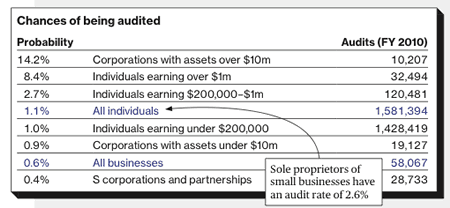
With doing our taxes properly on our minds, what are the chances we’ll get caught if we don’t? Well, there are several ways that the IRS can detect if your return is suspicious, especially if your inputs don’t match up with their W-2 and 1099 records.
Here are the number of IRS audits and the respective probabilities for individuals and businesses during 2010. Large corporations and wealthy individuals have the highest chance of getting audited, which makes sense since they offer the largest potential payoff. If you are an individual making under $200k a year, then your overall chances are 1 in 100. However, I’m sure if your tax return is clean and you didn’t claim to donate $10,000 in used clothing, your actual odds are even better.
Anyone out there get audited last year?
Posted in Taxes | 20 Comments »
Saturday, January 29th, 2011
Ready to do your taxes already? I haven’t seen any really good discounts from the Office Supply stores, even after rebate. With all these 1099s coming in, I took a look around for what discounts were available on the intertubes now.
When shopping for tax software, be sure to compare the total price if you have to complete a state tax returns, as that’s where they getcha these days. For reference, retail for TurboTax Deluxe Online for Federal is $49.95 with free eFile, while TurboTax Online State retails for $36.95 with eFile. Most places knock down the Federal price to at least $29.95. Total for Fed + State: $66.90. If your return is simple, often you can paper file your state return pretty easily yourself.
Free TurboTax Federal for Simple Returns
If you have a simple return with no itemized deductions like mortgage interest, no rental property, or sold any investments, then you can get the TurboTax Free edition with free eFile.
Free TurboTax Federal w/ Income Restrictions and Military
If you meet the income and/or military status requirements, the TurboTax Freedom Edition is free for Federal including eFile. Your adjusted gross income must be $31,000 or less, or you must qualify for the Earned Income Credit.
Covers all the forms, not just 1040EZ. State filing may also be free for those in AL, AR, AZ, GA, IA, ID, KY, MI, MN, MO, MS, NY, NC, ND, OK, OR, RI,
SC, VA, VT, WV. Otherwise it is $14.95.
Free TurboTax Deluxe with State Farm Bank
If you have a banking relationship with State Farm, you get free TurboTax Deluxe (log-in required). I can’t tell if this includes State? Reportedly it includes State e-File. Pretty good deal considering you can open up an account for $100 and get a $50 value every year for the past few years. Valid for first 25,000 registrants.
25% off Fed & State through Vanguard, Fidelity, State Farm
Vanguard, Fidelity, several other financial institutions, and State Farm site visitors all can save 25% off TurboTax online for both federal and state. Anyone can be a “site visitor”. This results in final prices of $22.45 Federal and $27.70 State. Total: $50.15 for Deluxe.
If you’ve got Flagship status at Vanguard (usually $1M in assets) or use their Asset Management Services, then you get TurboTax Federal and State online for free.
35% off Federal only via TD Ameritrade
TD Ameritrade “site visitors” can get 35% off TurboTax Federal, for a final price of $19.45. However, there is no discount on State, making it cheaper to go with the offer above unless you only want Federal. (You can’t mix and match discounts.)
35% off Fed + State Desktop Edition via Amazon.com
If you’re okay with the desktop edition instead of online, Amazon.com has it for $39.78 total, which includes Federal + State w/ eFile. This is about 35% off, but Amazon does fiddle with its prices all the time, so buy it now if you think it’s a good deal. This is the price to download the software yourself (less than 10 minutes on broadband).
More Free Alternative Options – IRS FreeFile and TaxACT
Not devoted to TurboTax? You can also check with the IRS FreeFile site to see if you qualify for other free software, usually restricted by income or military status.
Then there’s always the best no-hassle deal around: TaxACT Free Edition, which again offers a free Federal return + free eFile. Covers everything including itemized deductions and capital gains. State return is $14.95. Total for Fed + State: $14.95.
Posted in Taxes | 25 Comments »
Thursday, January 27th, 2011
During recessions, interest in graduate school rises as people lose their jobs or otherwise decide to go back to school for better prospects. Are you thinking about law school? I’ve thrown the idea around, as I think estate law would be a growth area. Well, check out these stats from the National Association for Law Placement (NALP) first.
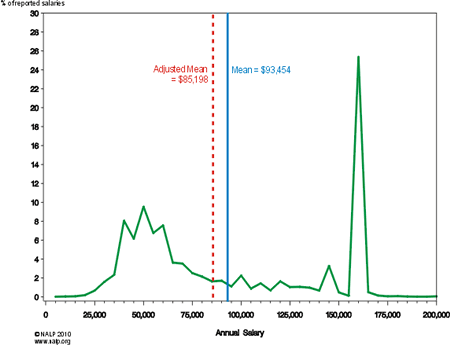
The NALP found the national median starting salary for full-time law jobs for the Class of 2009 was $72,000 and the average was $93,454. After adjusting for the fact that many smaller law firms don’t report salary details (and also tend to pay less), it found the adjusted average salary to be $85,198. But you should also consider the distribution of the salaries as well, shown below.
Distribution of Reported Full-Time Salaries — Class of 2009

From this Law.com article:
That’s because salaries are clustered in two areas — a phenomenon known as the bimodal distribution curve. One cluster is in the $40,000 to $60,000 range and the other around $160,000. The lower range tends to include attorneys in public interest and government jobs, while the higher cluster includes associates at large law firms.
This means that after three years of law school and probably accumulating more student debt, lots of new grads are still far away from six-figure salaries. For the Class of 2009, 1 out of 4 are working temporary jobs. Going to law school primarily for the money can be a long road.
What about after the entry-level? This article quotes the Department of Labor as stating that the median lawyer makes $113,000 per year, and those in the 25th percentile make $76,000 per year. Certainly, many people still make solid livings as lawyers. I know a lot of other JDs that are doing things unrelated to law as well, and most of them are doing alright. However, I don’t know if they would have still gone to law school again if given a redo.
Posted in College & Education | 32 Comments »
Wednesday, January 26th, 2011
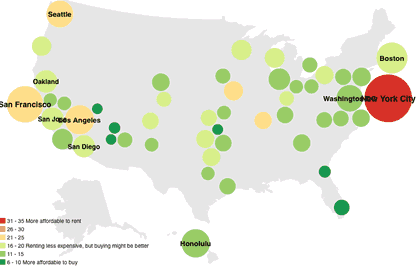
Buy vs. rent? It’s still a tough question for a lot of folks. According to real estate website Trulia.com, one rule of thumb is to divide the median list price compared with the median rent of similar properties. If the price/rent ratio is over 20, you should rent because buying is too expensive. From 16-20, it can be a grey zone, depending on a variety of factors. If it is under 15, you should consider buying. Very rough, but it’s a place to start.
Trulia has calculated this ratio for the two-bedroom apartments, condos and townhomes listed in their database for the largest 50 cities in the US, and illustrated them on an interactive chart. There are a few options to play around with. (Click to visit and enlarge.)
It looks like big red New York City is still more affordable to rent, with more cities being pockets of green. Supposedly, in 72% of major cities it is now more affordable to be a homeowner. I guess we’ll see if they’re right. I just added some nice vinyl fencing to my money pit home sweet home. Specific cities are highlighted in this related CNN Money article.
Posted in Real Estate | 9 Comments »
Wednesday, January 26th, 2011
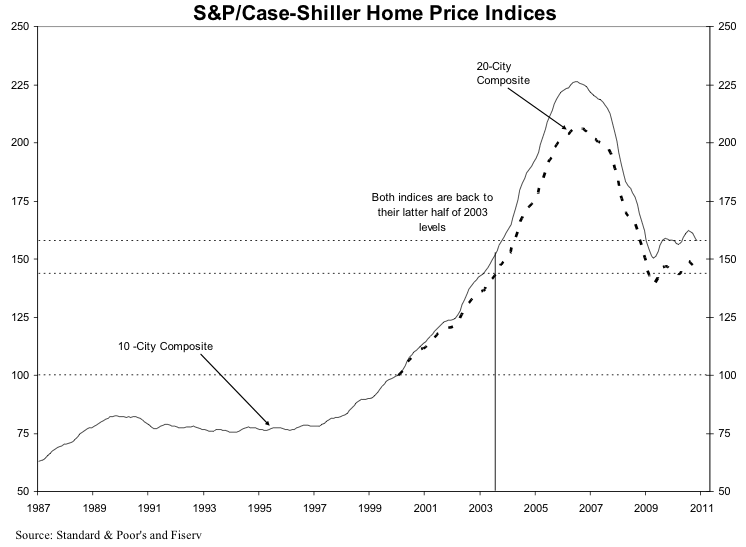
The S&P Case Shiller Home Price index was updated yesterday with data through November 2010. Here is the press release [PDF]. Here is the housing price index from 1987 to November 2010. (Click to enlarge.)
I don’t look to closely into these things or like to make crystal ball predictions, but I like to check in occasionally to see what’s happening. It looks like we are still hovering around 2003 price levels.
Read the rest of this entry…
Posted in Real Estate | 5 Comments »
Monday, January 24th, 2011
You often hear that stock investing is a sure thing over the “long run”. But as this chart from the NY Times and Crestmont Research shows, there is still a lot of luck involved. Your actual returns depend a lot upon when you start, and also when you finally withdraw. The matrix includes annualized returns for the S&P 500 for every starting year and every ending year since 1920, adjusted for inflation. (Click to enlarge.)
After accounting for dividends, inflation, taxes and fees, $10,000 invested at the end of 1961 would have shrunk to $6,600 by 1981. From the end of 1979 to 1999, $10,000 would have grown to $48,000.
“Market returns are more volatile than most people realize,” Mr. Easterling said, “even over periods as long as 20 years.”
There’s a lot of information contained in this chart. Some observations:
- As your holding period lengthens, the returns converge towards the median of about 4% above inflation. Anything higher than that is very rare.
- The “long run” may be a lot longer than most people think. It can take 40+ years to get to that 4% real return, not just 15 or 20. Now, if you’re in your 20s or 30s, you probably will have a holding time of 40+ years for the money you’re investing now.
- Visually, investing from about 2000 onwards looks at least so far somewhat like investing from about 1970 onwards. (Both pockets of red in the early years.) Not the most exciting prospects.
However, even if you start out strong, over the long run the returns also drift back towards the long-term median. It’s the money that you invest right before retirement that can be the most at risk.
Posted in Investing, Retirement | 26 Comments »
Friday, January 21st, 2011
Here’s a quick note for those considering applying for a Discover credit card, which came up after a few folks got rejected from the Discover More Card offering 0% interest on balance transfers for 12 months with no balance transfer fee. The limited time offer is scheduled to last until February 28, 2011.
On the upper right hand of the application, there is some light grey print that you might overlook that says “Offer Valid For New Cardmembers only”. However, it wasn’t really clear what this meant. You can’t have a current Discover More card? any current Discover card? any Discover card ever?
It turns out that there is a new Discover policy that anyone can only have one open Discover Card of any type at a time. As long as you don’t have an open Discover card currently, you can apply for a new card.
Below is the text from my Live Chat sessions with Discover. Basically, if you want this no balance transfer fee promotion and you already have a Discover card, you must cancel that card first, and then come back and apply for this new card. You can’t switch cards and still get this promotion.
Patricia: I appreciate your interest in the Discover Card. What questions can I answer regarding your application today?
Jonathan: Hello, I am interested in applying for this Discover More card. I don’t have a Discover More card, but I do have an old Discover Miles card. I am able to be approved for this card?
Patricia: I am sorry but we do have a one account policy at this time so we cannot open an additional account. Would you like us to switch the card type you have with us?
Jonathan: That would be okay, as I don’t use my Discover Miles card anymore. Would I still be able to get the 0% for 12 months with no balance transfer fee?
Patricia: Thank you for your business! This chat is to assist with applying for a Discover Card and we do not have access to any Account information. I will transfer you to our Customer Service chat for assistance with your Account. They will access that account and see what is available on it for transfer for you.
[Result: No, the offers in my account were much worse with higher fees.]
Patricia: I appreciate your interest in the Discover Card. What questions can I answer regarding your application today?
Jonathan: hello… if I recently closed a Discover card but currently do not have one, can I still apply for this new More card iwth 0% for 12 months? Do I still count as a new cardmember?
Patricia: You can apply for this card if that other account is closed.
Jonathan: So basically a person is just allowed to have one open Discover card, of any type, at a time now?
Patricia: Correct
Jonathan: Great, thank you for your help. That’s all for me today.
Posted in Credit Cards, Deals & Offers | 11 Comments »
Friday, January 21st, 2011
Here’s a decision chart that’ll amuse those of you who work independently, perform some freelancing/consulting work, or just happen to be especially good at something. Should you do the work for free? Well, it depends:

(click to visit site)
By Jessica Hische at ShouldIWorkForFree.com.
Posted in Entrepreneurial, Self-Employment | 5 Comments »
Thursday, January 20th, 2011
Ah, budgeting. New year, same old goals? While I’m not one of those people that think everyone needs a detailed budget, I do think everyone should track their spending at least once a year or so. This way, you have a real snapshot of where your money is going (which may just surprise you). Writing down every little transaction on a piece of paper or even tapping it into your smartphone can get really tedious. So here’s what I do to manage it in 15-minutes a year.
Put All Your Spending On A Credit/Debit Card
The main idea is to put all your spending in an electronic format so that a bank keeps track of all your purchases for you instead of little slips of paper. If you don’t like credit cards, use a debit card. But credit cards offer superior consumer protection features, so I prefer them. You don’t need to put it all on one card, but it does make things simpler.
Now, do this for a month, and avoid paying cash whenever possible. Don’t change your spending behavior, and there is no need to record anything.
Sign Up For Mint.com
Next, you should sign up for the online aggregator tool Mint.com. I also like versions of Yodlee, but it looks like their development has slowed significantly. To start, all you need is your e-mail address and the login details for your credit card website.
I know that many people are wary about giving out their login credentials, but in my opinion your credit card login is not as sensitive as say, a bank login. Credit card companies make so much money that they are happy to refund any fraudulent charges immediately. It is in their interest to make you feel very safe about using credit cards.
Anyhow, Mint has improved their back-end system so that most credit card information syncs up fairly quickly. Click on the “Transactions” tab on the top of the page, and you should see all your recent purchases. You can wait until after a month of spending on the card, because Mint should upload all your historical transactions within the last few months.
Categorize Transactions
Without any input from you, Mint will have tried their best guess for the Category of each of your purchases. They’ve gotten better, but there will likely still be a few that are incorrectly categorized or simply left labeled as “Uncategorized”. In addition, some of your purchases from a megastore like Walmart/Target/Costco might be “groceries” or it might be “electronics”.
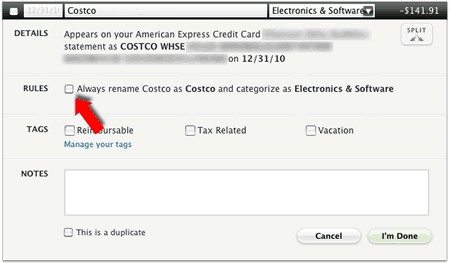
Use the the pull-down menus and spend a little time “teaching” Mint the proper categories that you prefer. If you want all future CVS purchases to be under “Groceries” instead of “Pharmacy”, you can click on Details and make a rule that will do that for you automatically. This saves lots of time in the future.
Finally, if you have certain transactions that you wish to have Mint ignore in your budget calculations, use the “Exclude from Mint” category.
Pretty Pie Charts!
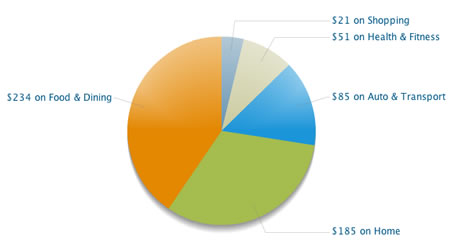
After all your transactions look nice, click on the “Trends” tab on top, and check out some pretty pie charts created from your spending history. The charts are very interactive, click around and drill down into your data. You might need to go back and re-label some expenses to get everything to sort nicely.
Now you should have a clearer idea of where your money goes. If you have bills that you had to pay by bank account, you’ll want to account for those separately if you don’t want to sync it up with Mint. If you make some small cash purchases, just track your ATM withdrawals. I just made a rule that labeled all ATM withdrawals “Dining Out”, since that’s usually where it goes.
Posted in Budgeting | 12 Comments »
Wednesday, January 19th, 2011
LivingSocial is a group-buying deal-a-day website like Groupon, and I guess they want some attention too.
They’re offering a $20 gift card to Amazon.com for only $10, looks like at every major US city today. Over a million have been sold already, with about 10 hours left as of this writing. So hurry! (Sorry couldn’t post this earlier, I’m on the road…)
Posted in Deals & Offers | 10 Comments »
Tuesday, January 18th, 2011
The results of my Emergency Fund survey are in, and appears that there are a lot of big savers out there! 28% of respondents had cash reserves of over 12 months of expenses, and 24% of you had the more-often recommended 4-6 months of expenses.
With such sizable cash reserves, where you do guys put it all? I figured I’d share my stash-the-cash choices, which may not be perfectly optimal but I’m open to talking about it. The size of the circles are proportional to how much of my money I keep in each respective account.
With interest rates so low across the board and still dropping it seams, it’s been hard to get really excited about many new options. But remember, it can be better to be earning 2% with low inflation than 5% interest in a high inflation environment. Every basis point helps.
Rewards Checking Accounts
You’ve likely heard of these by now. Usually through local credit unions, these checking accounts pay a higher interest rate if you jump through some hoops each month. However, if you make a mistake you’ll forfeit virtually all your interest for that month, so it can be tricky. More coverage here.
One nationally-open example is DanversBank, which offers their Free Rewards Checking currently paying 3.01% APY on balances up to $25,000, provided you satisfy the following each month:
* perform at least 12 debit card transactions (excluding ATMs);
* receive their monthly statement electronically;
* access Online Banking, and
* sign up for direct deposit or receive a recurring ACH transfer
To find a local rewards checking account limited to your area, check out DepositAccounts and use the filters. Sadly, my local account recently dropped their rate significantly.
Long-Term CDs – Ally Bank
If you have a large cushion, it’s quite possible (if you’re lucky) to not have to touch it for years or more. Therefore, I think it’s okay to put some of it in safe investments but slightly less liquid.
With the Ally Bank certificates of deposit, you can still access your money as long as you pay a early withdrawal penalty of 60 days interest. That’s significantly less than at other banks. I have a 5-year CD paying 3% APY, but the current rate for new deposits is APY for a 5-year CD.
Rates change constantly, but let’s assume you have a certificate of deposit from any bank paying 2.39% APY with an early withdrawal penalty of the last 60 days of interest. (2.39% APY ~= 2.26% rate compounded daily.) Here’s how your actual annualized interest rate would fluctuate given your holding period.
After just 6 months, you’ll already be earning 1.58%, more than a comparable 12-month CD. If you somehow had to withdraw after 1 year, you’d still have earned 1.99% APY. Basically, after just 6 months I have nothing to lose and a lot to gain, so I keep a sizable chunk here.
Savings Bonds
I have some older Series I Savings Bonds, but they aren’t a very good buy right now. The total rate consists of a fixed rate and a variable rate that adjusts with inflation every 6 months. If you bought a bond now, you’d get a 0% fixed rate and only 0.74% from inflation. However, my older bonds have higher fixed rates, and according to my TreasuryDirect statement they are earning 1.74%, 2.25%, and 2.75% right now. The annual purchase limit is now $5,000 in paper I-bonds and $5,000 in online I-bonds per Social Security Number. I’ll keep them for a while, as I like the tax deferral benefits and inflation may come back to bite us.
Online Savings Accounts
Rewards checking account and savings bonds have deposit limits, and you only want to lock up a certain amount in longer-term CDs, so the rest goes into the now-popular online savings account. There are a lot of players out there now, but many of them are packed together with very similar features and interest rates.
Right now the rest of my cash is over at SmartyPig.com, an FDIC-Insured bank account that lets you save for specific goals like an online piggy bank. However, they’ve added so much flexibility that you can pretty much use them like any other savings account. Their rate has dropped recently from 1.75% APY to 1.35% APY for balances up to $50,000. This is still amongst the top rates, but I’ll be watching them closely.
Alternatively, Everbank has their Yield Pledge Money Market paying 2.01% APY for the first 3 months for new accounts. This rate is higher than any 3-month certificates of deposit currently available, while still being available for withdrawals at any time. The rate is guaranteed stay in the top 5% of competitive accounts. Evantage Bank has their Mega Money Market account paying 1.75% APY for balances up to $35k. Most other banks are clustered around the 1% to 1.2% mark.
So… where’s your cash?
Posted in Banking, Investing | 30 Comments »